• Tools
  • Tools
loading...
No Results
  • Get Started
    • Welcome to GoInsight.AI
    • How GoInsight.AI Works
    • Building Your First Simple Workflow
    • LLM Selection Guide
  • Marketplace
    • Marketplace
  • Documents
    • Workspace Documents
    • Personal Data
  • InsightFlow
    • InsightFlow Introduction
    • Types of InsightFlow
    • Editing and Debugging an Interactive Flow
    • Services & Tools
      • Tool
      • Service
      • Agent Strategy
    • Node
      • Start
      • Answer
      • LLM
      • Knowledge Base Retrieval
      • Document Read
      • Document Write
      • Document Delete
      • HTTP Request
      • KnowledgeFocus LLM
      • Agent
      • Progress
      • Tool Call
      • IF/ELSE
      • Question Classifier
      • Branch Aggregator
      • Multi branch Selector
      • Iteration
      • Interactive Form
      • Pause & Resume
      • Delay
      • Auto-Continue
      • Template
      • Code
      • JSON Variable Extractor
      • Variable Assigner
      • Variable Extractor
      • End
    • Error Handling
      • Node Error Handling
    • Publishing
      • Publishing an Interactive Flow
      • Security Settings for Interactive Flow
      • Publishing a Service Flow
      • Create Your First Workflow
  • GoInsight Workspace
    • GoInsight Workspace Introduction
    • Collaboration Workspace
  • Quick Chatbot
    • Build a Quick Bot
  • Team Management
    • Access Control
    • Usage
    • Audit Center
    • Credential Management
  • Knowledge 101
    • Key Concepts
    • Data Security
    • ABEvent
    • Interactive Form: JSON Configuration
    • Context Is the Foundation of AI Collaboration
    • Build Collaborative Context with Say It for Me
Home > Documentation > InsightFlow > Publishing

Security Settings for Interactive Flow

While automation processes operate efficiently, data security and privacy protection remain core concerns for enterprises. GoInsight.AI's Interactive Flow supports flexible security control configurations, implementing layered defenses from access permissions to data interaction links, ensuring automated processes execute securely within controlled environments.
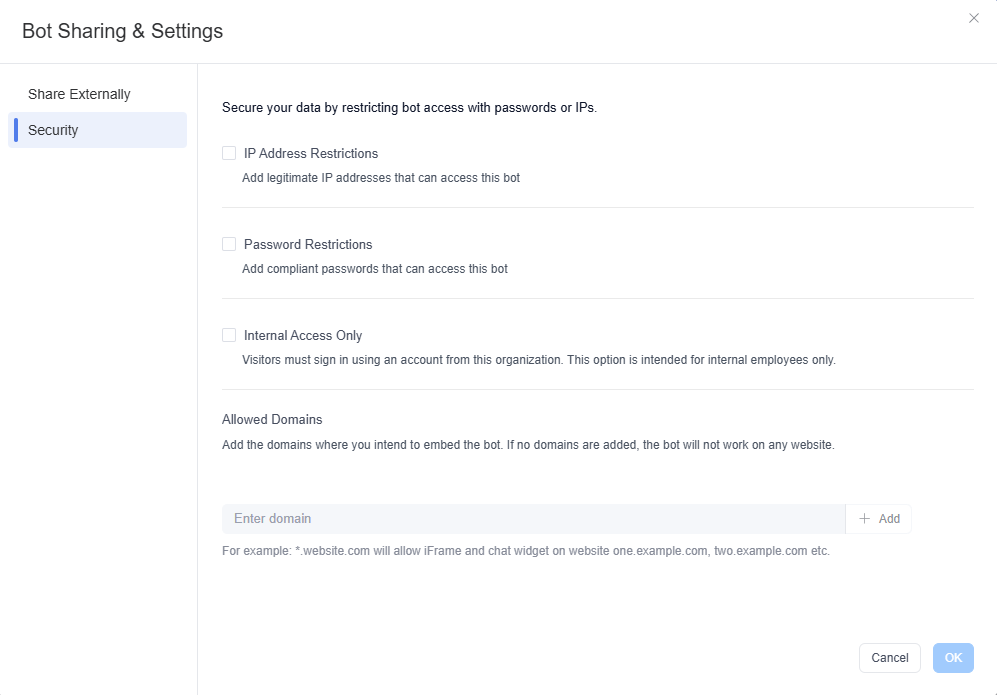
bot security settings

After creating a interactive workflow, you can also configure the following security settings:

1. Restrict Access with Password or IP Whitelisting to Protect Your Data

  • Purpose
    • A dual mechanism of password verification and IP whitelisting ensures that only authorized users can trigger or access the interactive workflow, preventing malicious attacks and data leaks.
  • Application Scenarios​
    • Financial Industry Compliance​: Restrict access to conversation flows containing customer privacy data to internal IPs or VPN channels only.
    • API Abuse Prevention​: Set dynamic passwords for externally facing bots to prevent unauthorized third-party calls.

2. Restrict Access to Internal Enterprise Personnel Only

  • Purpose
    • When enabled, only accounts within this organization that are already logged into GoInsight Workspace can access or trigger this interactive workflow (Bot).
  • Application Scenarios
    • Internal Business Operation Entry: For conversational capabilities involving system writes or sensitive actions such as "Create Ticket," "Update CRM," or "Device Operation," callers must have organizational identity and permissions, enabling audit traceability.
    • Cross-Department Collaboration Dedicated Bot: Used for internal collaboration and execution within specific teams or projects, not intended to be accessed by external channels or non-organizational users.

3. Domain Whitelist

  • Purpose
    • Only requests originating from specified domains can trigger the workflow, blocking unauthorized access from phishing sites and crawler bots at the source.
  • Application Scenarios
    • E-commerce Customer Service Bot​: Restrict access to the company's official website domain only, preventing external platforms from maliciously scraping promotional strategies.
    • Cross-System Data Synchronization​: Only authorized partner domains can trigger supply chain information synchronization workflows.
Updated on: Jul 8, 2026
Was This Page Helpful?
Prev Publishing an Interactive Flow
Next Publishing a Service Flow
Discussion

Leave a Reply. Cancel reply

Your email address will not be published. Required fields are marked*

Product-related questions?Contact Our Support Team to Get a Quick Solution>
On this page
  • Password and IP Restrictions
  • Internal Access Only
  • Domain Whitelist
loading...
No Results