• Tools
  • Tools
loading...
No Results
  • Get Started
    • Welcome to GoInsight.AI
    • How GoInsight.AI Works
    • Building Your First Simple Workflow
    • LLM Selection Guide
  • Marketplace
    • Marketplace
  • Documents
    • Workspace Documents
    • Personal Data
  • InsightFlow
    • InsightFlow Introduction
    • Types of InsightFlow
    • Editing and Debugging an Interactive Flow
    • Services & Tools
      • Tool
      • Service
      • Agent Strategy
    • Node
      • Start
      • Answer
      • LLM
      • Knowledge Base Retrieval
      • Document Read
      • Document Write
      • Document Delete
      • HTTP Request
      • KnowledgeFocus LLM
      • Agent
      • Progress
      • Tool Call
      • IF/ELSE
      • Question Classifier
      • Branch Aggregator
      • Multi branch Selector
      • Iteration
      • Interactive Form
      • Pause & Resume
      • Delay
      • Auto-Continue
      • Template
      • Code
      • JSON Variable Extractor
      • Variable Assigner
      • Variable Extractor
      • End
    • Error Handling
      • Node Error Handling
    • Publishing
      • Publishing an Interactive Flow
      • Security Settings for Interactive Flow
      • Publishing a Service Flow
      • Create Your First Workflow
  • GoInsight Workspace
    • GoInsight Workspace Introduction
    • Collaboration Workspace
  • Quick Chatbot
    • Build a Quick Bot
  • Team Management
    • Access Control
    • Usage
    • Audit Center
    • Credential Management
  • Knowledge 101
    • Key Concepts
    • Data Security
    • ABEvent
    • Interactive Form: JSON Configuration
    • Context Is the Foundation of AI Collaboration
    • Build Collaborative Context with Say It for Me
Home > Documentation > InsightFlow > Node

Document Delete Node

The Document Delete node deletes specified workspace documents. When performing batch deletions or handling high-risk documents, we recommend pairing this node with manual intervention steps, such as the Pause and Resume node, to keep the process under control.

This node is suitable for:

  • Cleaning up expired content (to avoid subsequent processes/AI referencing outdated materials)
  • Compliance/privacy deletion requests (more reliable when combined with approval and audit)
  • Automatic cleanup of temporary data upon expiration (data minimization)
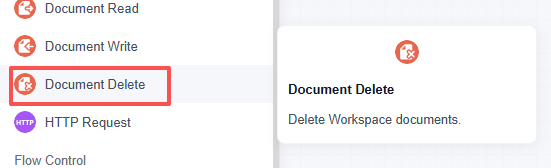
document delete mode

Configuration

After adding the "Document Delete" node to the canvas, click the node and configure the following settings in the right-side configuration panel:

Document (required)

Specifies the workspace document to be deleted.

  • Click the "+" button to select the workspace document to delete;
  • Or use "Variable/Expression" to enter the document path/ID (supports variable insertion).

Error Handling

Configure the error handling strategy for the node. If a critical error occurs during execution that prevents the node from producing output, the configured strategy will be applied to avoid interrupting the entire Workflow.

Remarks
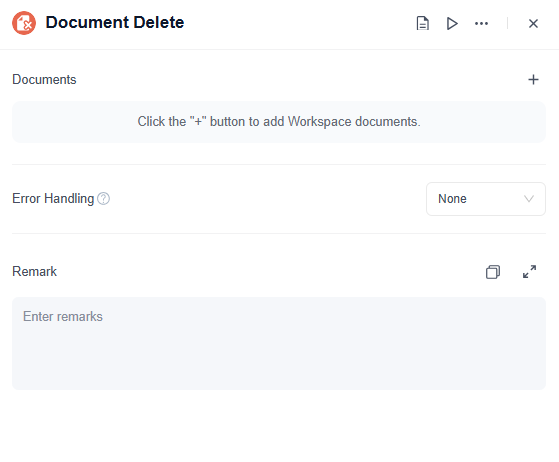
configure document delete node

Usage Examples

Example 1: Expired Document Cleanup (Content Governance)

Scenario: After policy, script, or process documents are updated, old versions need to be deleted to prevent subsequent processes from continuing to reference outdated standards.

Workflow example (simplified):

  • Locate the old version document (specific document ID/path/name determined by upstream nodes)
  • Document Delete node (select the old document)
  • Notify and log: Record "Old version cleanup completed" in the Workspace or system logs. (Optional)

Example 2: Compliance Deletion (Manual Approval Recommended)

Scenario: You receive a privacy deletion request that requires human approval and an auditable process.

Workflow example (simplified):

  • Submit a deletion request (via a form or ticket).
  • Pause the workflow to wait for manual approval. (Recommended)
  • The Document Deletion node removes the document.
  • Write the result back to the ticket or notify the requester. (Optional)
Updated on: Jul 9, 2026
Was This Page Helpful?
Prev Document Write
Next HTTP Request
Discussion

Leave a Reply. Cancel reply

Your email address will not be published. Required fields are marked*

Product-related questions?Contact Our Support Team to Get a Quick Solution>
On this page
  • Configuration
    • Document (required)
    • Error Handling
    • Remarks
  • Usage Examples
loading...
No Results