Definition
The Knowledge Retrieval node is used to retrieve relevant content segments from specified documents or knowledge bases based on the user's input question.
This node does not generate the final answer itself; instead, it finds materials related to the question and outputs the retrieval results for use by subsequent nodes. It is usually used together with the LLM node, where the LLM node generates the final response based on the user's question and the retrieval results.
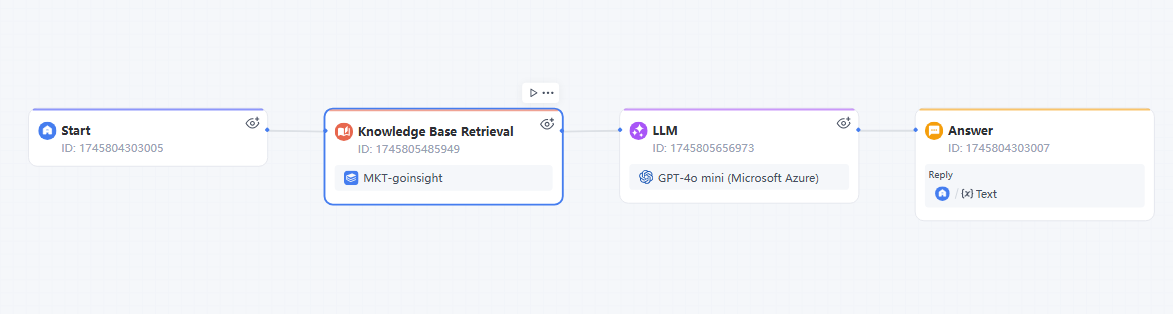
Common flow:
- The user inputs a question at the Start node.
- The Knowledge Retrieval node retrieves relevant segments from specified documents.
- The LLM node generates an answer based on the user's question and the retrieval results.
Document Types Available for Retrieval
In GoInsight's Workspace documents, document types include:
- Rich text documents
- Code or plain text documents
Among these, the Knowledge Retrieval node is mainly used for knowledge Q&A scenarios and can only select rich text document content for retrieval.
- Code or plain text documents are not used for knowledge Q&A and therefore cannot be selected by the Knowledge Retrieval node.
- Personal Data is used to store the user's personal knowledge or personal data and also cannot be selected by the Knowledge Retrieval node.
- If you need to read content from code, plain text, or Personal Data in the Workflow, use the Document Read node.
Adding the Node
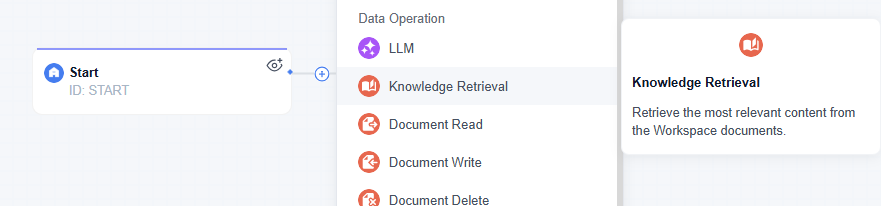
In the Workflow editing page, you can add the Knowledge Retrieval node by:
- Right-clicking on the canvas and selecting the Knowledge Retrieval node.
- Or clicking the "+" sign at the end of the previous node to add the Knowledge Retrieval node.
Configuration Instructions
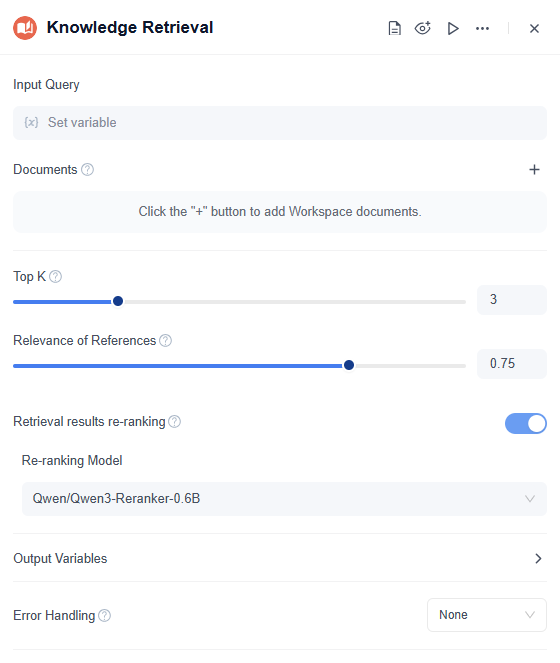
Input Query
The input query is the question or keyword used for retrieval.
Insert an upstream variable, for example, the Start node's Query, which should be of String type.
Document
Document specifies the scope for retrieval.
Click the "+" button to add the Workspace documents to be searched. When the node runs, it only searches for relevant segments within the added document scope.
Top K
Top K controls the maximum number of related segments returned. Up to 10 citations can be output.
For example:
- Top K = 3: returns up to 3 related segments.
- Top K = 5: returns up to 5 related segments.
The larger the number, the more content is returned, but the subsequent LLM node may need to process more irrelevant or duplicate information.
Relevance of References
Relevance of References controls the matching degree between the retrieval results and the query content.
The higher the value, the more precise the results generally are, but fewer results may be returned.
The lower the value, the more results may be returned, but relevance may decrease.
If no content is retrieved, try lowering the Source Relevance.
If the returned content is not accurate enough, try increasing the Source Relevance.
Retrieval Results Re-Ranking
When enabled, the system performs a secondary ranking of the initially retrieved results, placing segments more relevant to the user's question at the top.
This feature is suitable for scenarios with extensive document content, a large amount of similar content, or where improved retrieval accuracy is desired.
When is rerank needed?
- Top-k is large, and you need to select the most relevant segments for the LLM. For example, vector search first captures 40–80 segments, then uses a reranker to select the most relevant 5–10 segments. This is common when the knowledge base is large, documents are long, and chunks (text blocks) are numerous.
- The user's question is detailed, or semantically similar but importantly different. For example, "refund policy" and "return policy" are similar but may have different answers. Vector search may capture both, but the reranker can more accurately judge which segment truly answers the question.
- Document quality is uneven (e.g., similar questions are scattered across many places without good organization), or chunk noise is high (e.g., useless information is not removed). If initial retrieval often captures relevant but not direct content, rerank can place the content that "truly answers the question" at the top.
When should rerank not be used?
- The query is simple, data volume is small, and retrieval is already accurate. For example, when searching only among dozens of files, or when a metadata filter already hits precisely, rerank may introduce semantic interference from the question.
- Top-k is small. If you only capture 3–5 segments, rerank's improvement space is limited and may even worsen results due to reranker misjudgment.
- The reranker does not match the task. For example, the reranker is a general semantic relevance model, but your task requires precise numbers, time, table fields, or code dependencies. In such cases, the reranker adds no value for semantically irrelevant content, and a specialized retrieval strategy may be needed instead.
Re-ranking Model
The rerank model is used to rescore and re-sort the retrieval results after Retrieval Results Rerank is enabled.
For example, select Qwen/Qwen3-Reranker-0.6B.
After rerank is enabled, the output results will include RerankScore, representing the relevance score after reranking.
Output Variables
The Knowledge Retrieval node outputs the variable Result of type Array[Object], representing the list of matched segments.
| Field | Type | Description |
|---|---|---|
| BlockId | String | Segment ID |
| Text | String | Citation content |
| Score | Number | Citation relevance score |
| RerankScore | Number | Citation relevance score after rerank is enabled |
| Token | Number | Number of tokens in the citation segment |
Subsequent LLM nodes can reference Result to use the retrieved content as answer context.
Error Handling
The Knowledge Retrieval node supports error handling configuration.
If "No handling" is selected, the Workflow will be interrupted when the node execution fails.
Common error causes include:
- Empty or incorrectly formatted query variable.
- No searchable documents added.
- Document inaccessible.
- Retrieval or rerank execution failure.
Application Scenarios
The Knowledge Retrieval node is commonly used for:
- Enterprise knowledge Q&A
- Customer service Q&A systems
- Internal knowledge assistants
- Document content–based Q&A workflows
For example, when a user asks a product usage question, the Knowledge Retrieval node first finds related segments from product documents, then the LLM node generates an answer based on these segments.
Difference Between Knowledge Retrieval and Document Read
Both the Knowledge Retrieval node and the Document Read node can use document content in the Workflow, but they are used differently.
Knowledge Retrieval node matches the user's question against document content and returns only the segments most relevant to the question. It is better suited for knowledge Q&A scenarios, such as when a user asks a question and the system retrieves relevant content from many documents for the LLM to generate an answer.
Document Read node directly reads specified document content and usually outputs the full document or specified content to subsequent nodes. It is more suitable for scenarios that require reading a document in full, such as reading a configuration document, a fixed template, personal data in Personal Data, or code/plain text document content.
In brief:
| Node | Processing Method | Suitable Scenarios |
|---|---|---|
| Knowledge Retrieval | Matches relevant segments based on query content | Knowledge Q&A, customer service Q&A, RAG scenarios |
| Document Read | Reads specified document content | Fixed document reading, full text reading, Personal Data, code or plain text reading |
If you need to "find relevant content" from many documents, use the Knowledge Retrieval node.
If you need to "read a document's content completely," use the Document Read node.


Leave a Reply.