1. What is Personal Data?
Each user in the Documents module has a default Personal Data folder.
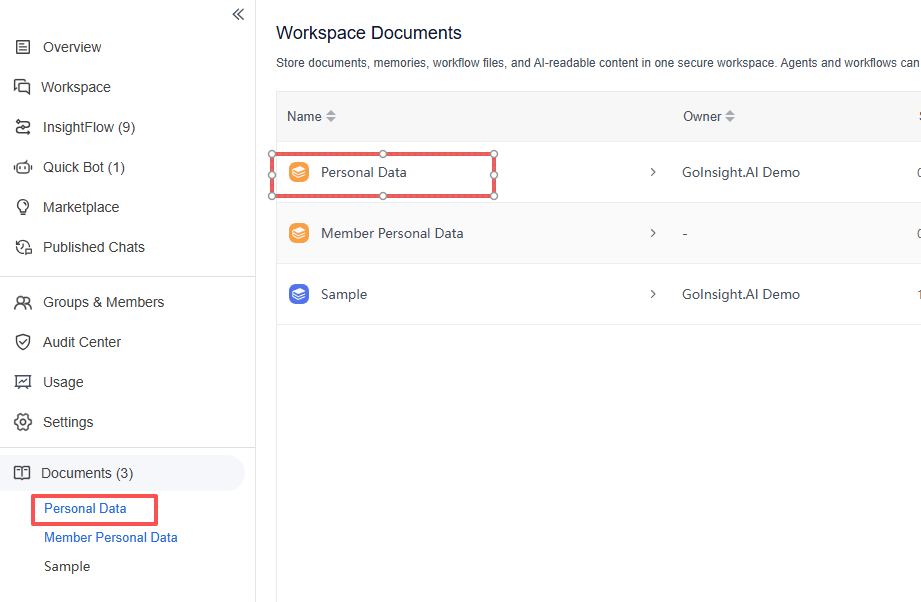
In workflow configuration, the Start node provides a variable: $PersonalDataPath
This variable represents the directory path of the current workflow executor's Personal Data folder in the Documents module.
This means that when different users run the same workflow, $PersonalDataPath points to each user's own Personal Data folder under their respective account, rather than a single fixed directory.
2. How to Use Personal Data?
2.1 Reading Documents in Personal Data
Used together with the Document Read node, $PersonalDataPath can retrieve document content from the current workflow executor's Personal Data folder.
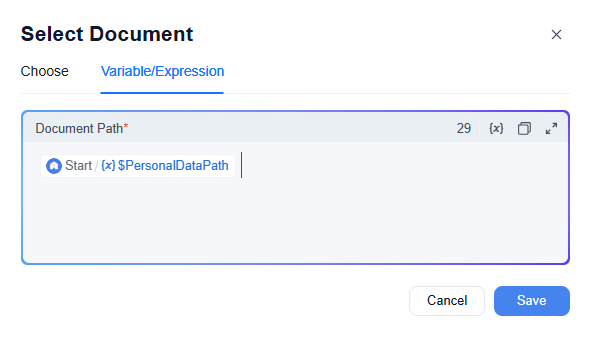
For example, suppose you need to read the Memory document in the current workflow user's Personal Data folder. You can configure the document path in the Document Read node as: $PersonalDataPath/Memory
When the workflow runs, the system automatically reads the document named Memory under the current executor's Personal Data folder, as shown below:
2.2 Writing Documents in Personal Data
The writing logic is similar to reading. In Workflow orchestration, you can use the Document Write node to write data into the current workflow executor's Personal Data folder.
For example, if you want to write data to the Memory document under the current user's Personal Data folder, you can configure the path in the Document Write node as: $PersonalDataPath/Memory
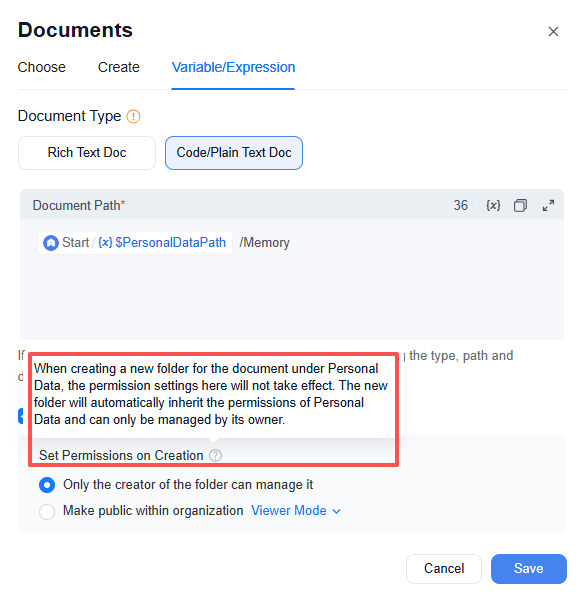
Unlike Document Read, when writing, if the current user's Personal Data folder does not have a Memory document, you can choose to automatically create a document named Memory and then write the content into it.
- When using the Document Write node to automatically create a document, the system provides a permission configuration option to set the initial permission of the automatically created document.
- However, if a new knowledge base category is being created under Personal Data, this permission configuration will not take effect. The newly created category will automatically inherit the permission rules of Personal Data, and only its owner can manage it.
3. Effects of Using Personal Data
Since $PersonalDataPath points to the current workflow executor's own Personal Data folder:
For the same workflow, with the process unchanged, when run by different users, the documents read from or written to are each user's own Personal Data folder content. This means the same workflow can produce different execution results based on different users' Personal Data content.
Common use cases include:
- Storing the user's own memory information
- Storing the user's own account information
- Enabling the same workflow to read different content based on different users' data
For example, if a workflow needs to read a user's own account information, the account information can be stored in the user's own Personal Data and then read via the Document Read node. This way, there is no need to duplicate multiple copies of the workflow for different users.
4. Differences Between Personal Data and Regular Documents
Regular Documents are typically a document space shared by the organization, suitable for storing common knowledge content within the organization, such as:
- Product descriptions
- Company introductions
- Customer QA
Without considering permission settings, when users within the organization access regular Documents under the same directory, the content they see is usually consistent. Personal Data, on the other hand, is more oriented towards storing data related to the individual user, with different users each having their own independent Personal Data content. In addition, Personal Data differs from regular Documents in the following ways:
- Personal Data does not support training
- Personal Data does not support RAG answering
- Personal Data cannot be added to the "Knowledge Base Retrieval" node
- Quick Bot does not allow documents in Personal Data to be used as a data source
- Personal Data folders do not support "editing" like regular document folders
The private permission of regular Documents is mainly used to control the visibility scope of documents, whereas Personal Data, although it can also achieve a similar "visible only to self" effect, is more fundamentally intended to let the workflow read or write the current executing user's own data at runtime.
Therefore, Personal Data is better suited to workflow scenarios that require "a thousand faces for a thousand people"—that is, the same workflow process remains unchanged, but when run by different users, different execution results can be obtained based on the data in each user's own Personal Data.
5. Member Personal Data
If you are the account owner, you will also see an additional Member Personal Data entry in Workspace Documents.
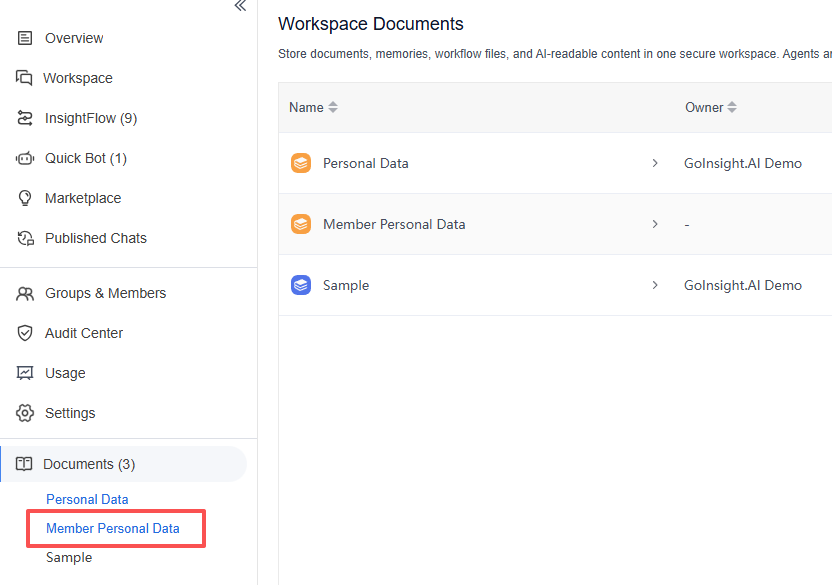
Member Personal Data is an entry used for centrally managing the Personal Data of organization members. Here, the account owner can view the list of members' Personal Data and perform corresponding management based on organizational permissions.
On the Member Personal Data page, you can typically see the following information:
- Member Personal Data name
- Associated user
- Number of stored documents
- Status
- Occupied size
- Last modified time
- Available actions
In addition, Member Personal Data likewise does not support direct editing like a regular document folder.
Personal Data is mainly used for reading and writing the current user's own personal data, whereas Member Personal Data is more of a unified entry for the account owner to view and manage organization members' Personal Data; it is not used to directly view or edit the specific document content of members.


Leave a Reply.