In the Collaboration Workspace, users can @mention the AI Assistant, an Interactive Flow, or a team member to move a task forward together within the same conversation thread.
In this collaboration model, context is not supplemental information; it is the foundation for subsequent collaboration. Whether the AI can understand the task accurately, whether the workflow runs correctly, and whether team members can quickly pick up on the previous discussion all depend heavily on how clear and complete the context in the current thread is.
When working with AI, context directly affects output quality. Clear task instructions, background information, constraints, and examples help AI understand user intent more accurately and generate responses that better match expectations. — Microsoft, Prompt Engineering Techniques
What Is "Say It for Me"
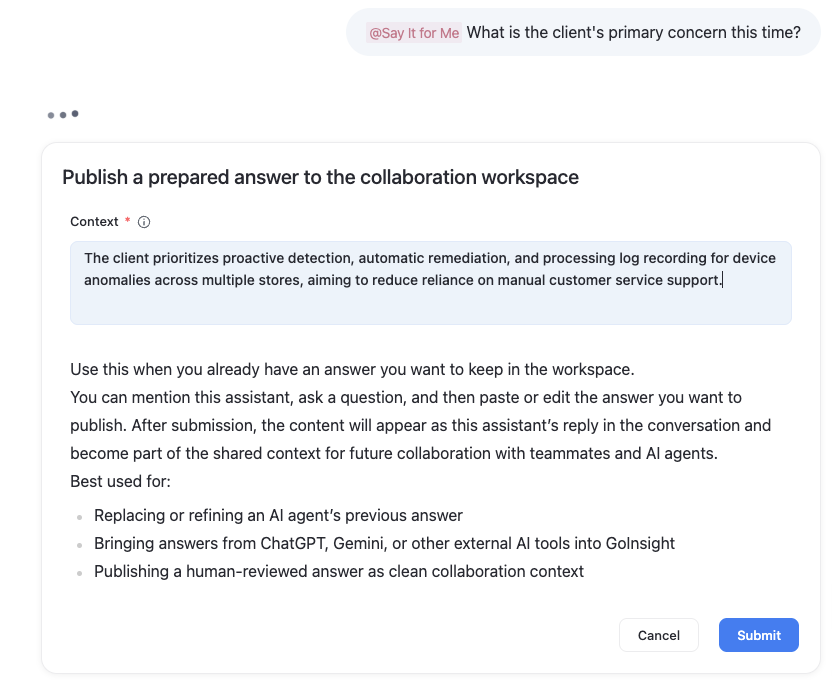
Say It for Me is a callable AI Assistant in Collaboration Workspace. It lets users save a response they have already prepared into the current collaboration thread in the format of "Question + Answer." In the input box of Collaboration Workspace, users can enter @ and select Say It for Me from the AI Assistant list. After selecting it, the user first enters a question, and the system then opens an interactive form where the user fills in the prepared answer.
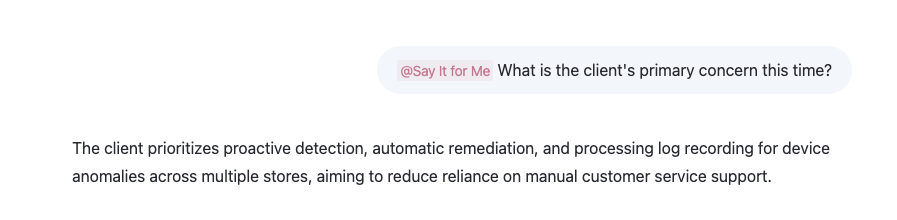
After submission, the answer appears in the current thread as Say It for Me's reply to that question, becoming part of the context that subsequent AI, workflows, and team collaboration can continue to reference.
For example, the process works as follows:
Step 1: Enter a question with @Say It for Me
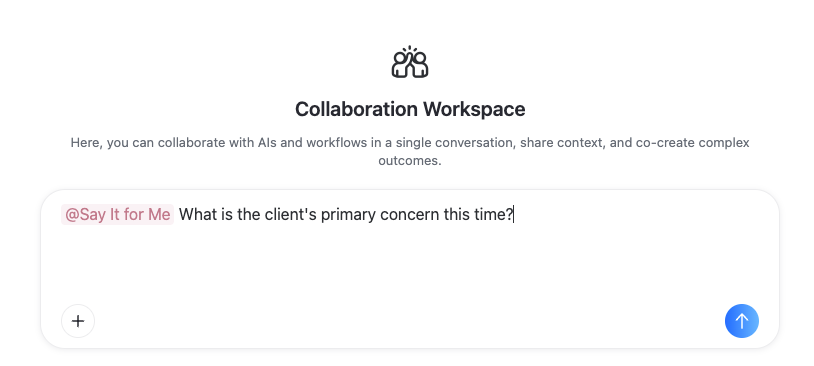
Step 2: Enter the prepared answer in the pop-up form and submit it
Result: The constructed question-and-answer context appears in the current conversation thread
Why You Need "Say It for Me"
In the Collaboration Workspace, some context can be brought in by the AI Assistant or Interactive Flow.
However, when discussing a new issue, users may also need a more appropriate answer drawn from external materials, team communication, or their own judgment. If that answer never enters the current thread, subsequent AI and workflows have nothing to build on.
Say It for Me solves this problem: it writes a user-confirmed answer into the thread as a "question + answer" pair, serving as the basis for follow-up discussion.
For example, while discussing a solution with AI, a user may find a more accurate conclusion from other sources midway through the conversation. They can use Say It for Me to add that conclusion to the thread, letting the subsequent discussion continue in that direction.
Why You Can't Enter Content Directly in the Dialog Box
In the Collaboration Workspace, users typically need to @ an object—such as an AI Assistant, an Interactive Flow, or another collaboration object—each time they enter input.
If a user enters plain content directly without @-mentioning any object, the system may return help instructions, reminding the user to continue with @workflow or @help. This interrupts the conversation that was originally being used to build up context.
Example Use Case: Customer Requirement Collaboration Scenario
Once the sales team has communicated with the customer and confirmed the customer's core requirements, you can use Say It for Me to capture the conclusion in the current thread.
User input:
- @Say It for Me What is the customer's most critical requirement from this communication?
- Fill in the confirmed answer in the form:
- The customer wants the system to automatically detect issues such as offline devices, network abnormalities, or unresponsive applications across multiple stores, and to automatically resolve them whenever possible to reduce the need for manual customer service intervention. Additionally, the exception handling results must be logged to support later review.
After submission, this "question + answer" pair becomes the context of the current thread.
- Next, @mention an AI
- @Requirement Analysis Agent Please organize the customer's core pain points and the questions that need to be followed up in the next meeting based on the customer requirements above.
This allows the AI to continue its analysis based on the confirmed answer, rather than guessing at the customer's requirements.


Leave a Reply.