• Tools
  • Tools
loading...
No Results
  • Get Started
    • Welcome to GoInsight.AI
    • GoInsight.AI Overview
    • LLM Selection Guide
  • InsightFlow
    • InsightFlow Introduction
    • Types of InsightFlow
    • Interactive Flow
      • Editing and Debugging Interactive Flow
      • Publishing an Interactive Flow
      • Security Settings for Interactive Flow
    • Service Flow
      • Editing and Debugging Service Flow
      • Publishing a Service Flow
    • Services & Tools
      • Tool
      • Service
      • Agent Strategy
    • Node
      • Start
      • Answer
      • LLM
      • Knowledge Retrieval
      • Document Read
      • Document Write
      • Document Delete
      • HTTP Request
      • KnowledgeFocus LLM
      • Agent
      • Progress
      • Tool Call
      • IF/ELSE
      • Question Classifier
      • Branch Aggregator
      • Multi branch Selector
      • Iteration
      • Interactive Form
      • Pause & Resume
      • Delay
      • Auto-Continue
      • Template
      • Code
      • JSON Variable Extractor
      • Variable Assigner
      • Variable Extractor
      • End
    • Node Error Handling Strategy
    • Create Your First Workflow
  • Marketplace
    • Marketplace
  • Documents
    • Workspace Documents
    • Personal Data
  • Workspace
    • GoInsight Workspace Introduction
    • Collaboration Workspace
  • Quick Chatbot
    • Build a Quick Bot
  • Team Management
    • Access Control
    • Usage
    • Audit Center
    • Credential Management
    • Model Management
  • Knowledge 101
    • Key Concepts
    • Data Security
    • ABEvent
    • Interactive Form: JSON Configuration
    • Context Is the Foundation of AI Collaboration
    • Build Collaborative Context with Say It for Me
    • Use Expressions with Variables
Home > Documentation > InsightFlow > Node

Multi-branch Selector Node

Definition

The Multi-branch Selector node is used to match different conditions based on the value of an input variable and route the Workflow to the corresponding branch.
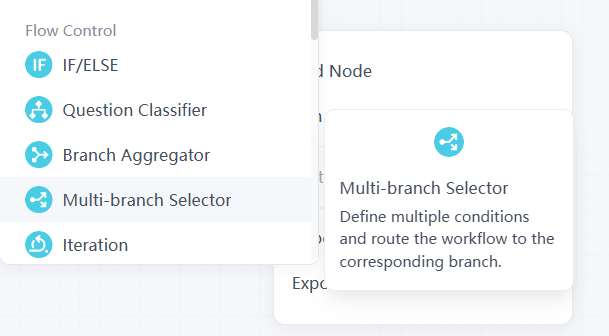
add-multi-branch-seletor-node

This node does not call AI capabilities nor perform semantic judgment; it matches strictly according to the configured rules.

For example:

  • Case 1: status = success
  • Case 2: status = failed
  • Case 3: status = pending
  • Default: other cases

When the value of the input Variable/Var satisfies a Case condition, the Workflow will enter the corresponding branch; if none of the Cases are met, it will enter the Default branch as a fallback path.

Note:
  • The Multi-branch Selector node supports case-insensitive matching. For example, input values Success, SUCCESS, or success can all match a condition configured as success.
  • However, this node requires exact character matching and does not support fuzzy matching. For example, if the condition is configured as success, input values such as successfully or success_01 will not be considered a match.
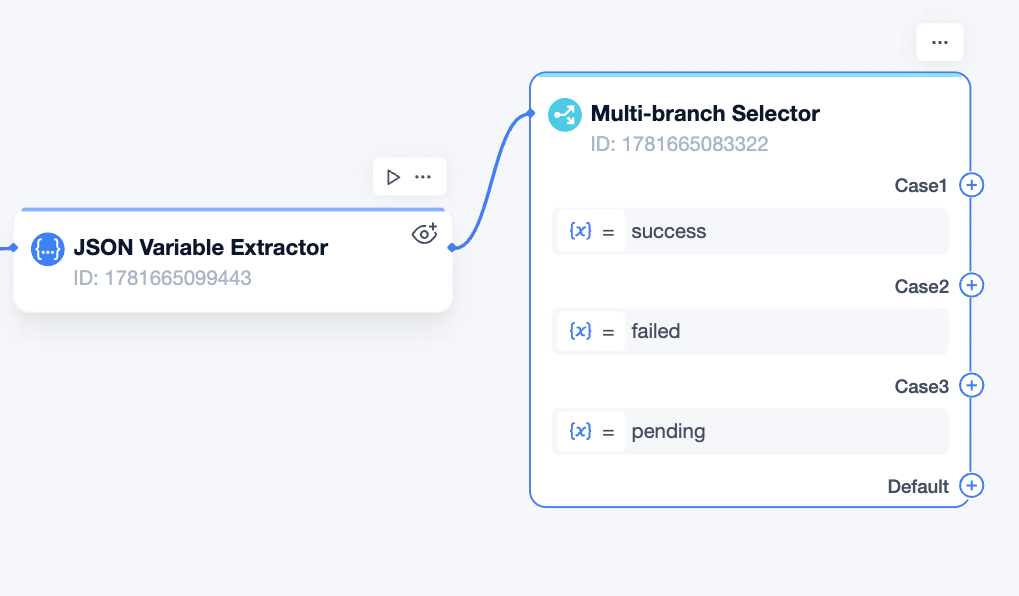
connect to multi branch selector node

Example Scenario

Suppose the subsequent process is determined based on the order status:

For example:

  • Case 1: order_status = paid → enter the shipping process
  • Case 2: order_status = unpaid → enter the payment reminder process
  • Case 3: order_status = refunded → enter the refund confirmation process
  • Default: enter the abnormal order handling process

Summary

The Multi-branch Selector node is suitable for handling flow branching with clear rules and explicit conditions.

If you need to route to different paths based on the exact value of a Variable/Var, use the Multi-branch Selector node; if you need to understand user intent based on natural language, it is more appropriate to use the Question Classifier node.

Frequently Asked Questions

Q1: What is the difference between a multi-branch node and a Multi branch Selector node?
  • Multi-Branch Selector Node
    Evaluates all branch conditions in parallel, with no priority order. Can match single or multiple branches simultaneously (requires configuration). Function Principle: Multi-way classification (e.g., order sorting).
  • IF/ELSE Node
    Evaluates in order of conditions; jumps on the first match. Only one path is selected.
Updated on: Jul 9, 2026
Was This Page Helpful?
Prev Branch Aggregator
Next Iteration
Discussion

Leave a Reply. Cancel reply

Your email address will not be published. Required fields are marked*

Product-related questions?Contact Our Support Team to Get a Quick Solution>
On this page
  • Definition
  • Example Scenario
  • Summary
loading...
No Results