Definition
The Question Classifier node uses the natural language understanding and reasoning capabilities of an LLM to analyze and automatically classify text input, such as user questions or conversation content. Based on preconfigured classification labels, such as “After-Sales” or “Pre-Sales”, it outputs the classification result that best matches the semantics of the input text and passes it to downstream nodes to determine the next processing step.
Node Configuration
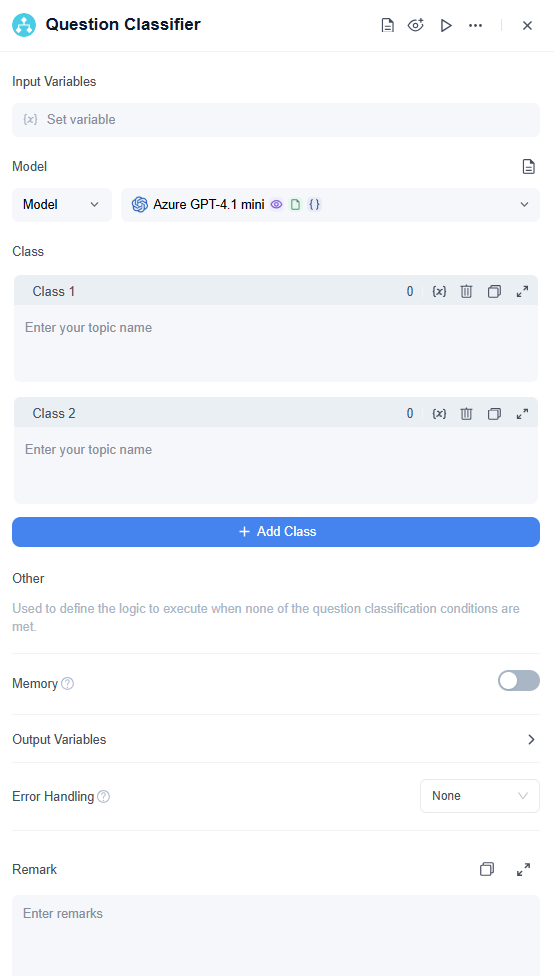
Configuration Steps:
- Input Variable: Select the content to be classified (file variables are supported). In customer Q&A scenarios, this is typically the user's question.
- Class: Manually add multiple classes. Provide keywords or descriptions for each to help the LLM better understand how to assign the correct class.
- Memory: Enable this to include chat history in the node's input. This helps the LLM understand context and improves its ability to comprehend questions during conversational interactions.
- Output Variables: This node outputs two variables: ClassName and Reason. ClassName stores the predicted class, and Reason stores the explanation. You can reference these results in downstream nodes to execute specific logic.
- Downstream Routing: Select the downstream node for each class. Once the node determines the class, the workflow will route to the corresponding path.
Configuration Details
1. Add a Question Classifier Node
On the app editing page, right-click on the canvas or click the + icon at the end of the previous node, then add and select the Question Classifier node.
2. Select Input Variable
Select the input variable that needs to be used for classification. The input content is usually a user question, conversation content, or text output from a previous node.
3. Model
Users can select a model in the node, such as Microsoft Azure GPT series models, OpenAI GPT series, Claude series, DeepSeek series, and other mainstream LLMs. Users can also configure the model temperature. Choosing the appropriate model and parameters helps improve classification performance.
4. Class Management
You can add multiple classes and write keywords or descriptions for each class to help the LLM better understand the classification criteria. This is used to identify the input intent and route it to different workflows.
Examples of classes:
- Questions related to after-sales service, such as product returns, exchanges, repairs, and warranties.
- Questions related to product operation and usage.
- Questions related to product purchasing.
When none of the classification conditions are met, the predefined “Other” class is used by default.
5. Memory
After Memory is enabled, each input of the Question Classifier node will include historical conversation content. This helps the LLM understand previous context and improves question understanding in conversational interactions.
Chat history supports two configuration methods:
- Specified: Directly specify the number of historical messages to reference.
- Interpolated: Pass historical messages through a variable.
Memory scope supports:
- Session: References historical messages in the current conversation thread. This is suitable for scenarios where complete context is needed to identify intent.
- Current Node: Only records the input and output of the current Question Classifier node itself. This is suitable when you only want the node to make judgments based on its own history.
For example, in a multi-turn customer service conversation, the user may only enter an incomplete question such as “How is this charged?” After session Memory is enabled, the classifier can use previous context to determine whether the user is asking about pre-sales, after-sales, product usage, or another type of question.
6. Output
The Question Classifier node outputs the following variables:
- ClassName: String type. Indicates the classification result, which is the class name matched by the model after judgment.
- Reason: String type. Indicates the classification reason, explaining why the model assigned the input content to that class.
Subsequent nodes can reference ClassName to determine the workflow path, or reference Reason to view the classification basis.
7. Error Handling
The Question Classifier node supports error handling.
When an error occurs during node execution, you can choose one of the following handling methods:
- No Handling: If the node fails, the workflow run will be interrupted.
- Default Value: If the node fails, the workflow continues to run and uses the configured default value as the node output.
- Error Handling Branch: If the node fails, the current path is interrupted and redirected to the configured error handling branch.
When Default Value is selected, you can configure default values for output variables, such as ClassName and Reason. In this way, even if the classifier fails, the workflow can continue running.
Simple Case Example
This model works great for classifying customer service questions. In a typical Q&A scenario, the Question Classifier automatically sorts customer questions before directing them to the right knowledge base for precise and helpful user responses.
Below is an example workflow template for a product-related customer service scenario:
In this example, we set up three classification labels/descriptions.
- Classification 1: AB-after-sales service
- Classification 2: AB-pre-sales
- Classification 3: Personal products
- If the user query doesn’t fit any of these conditions, the model executes the “Other” classification.
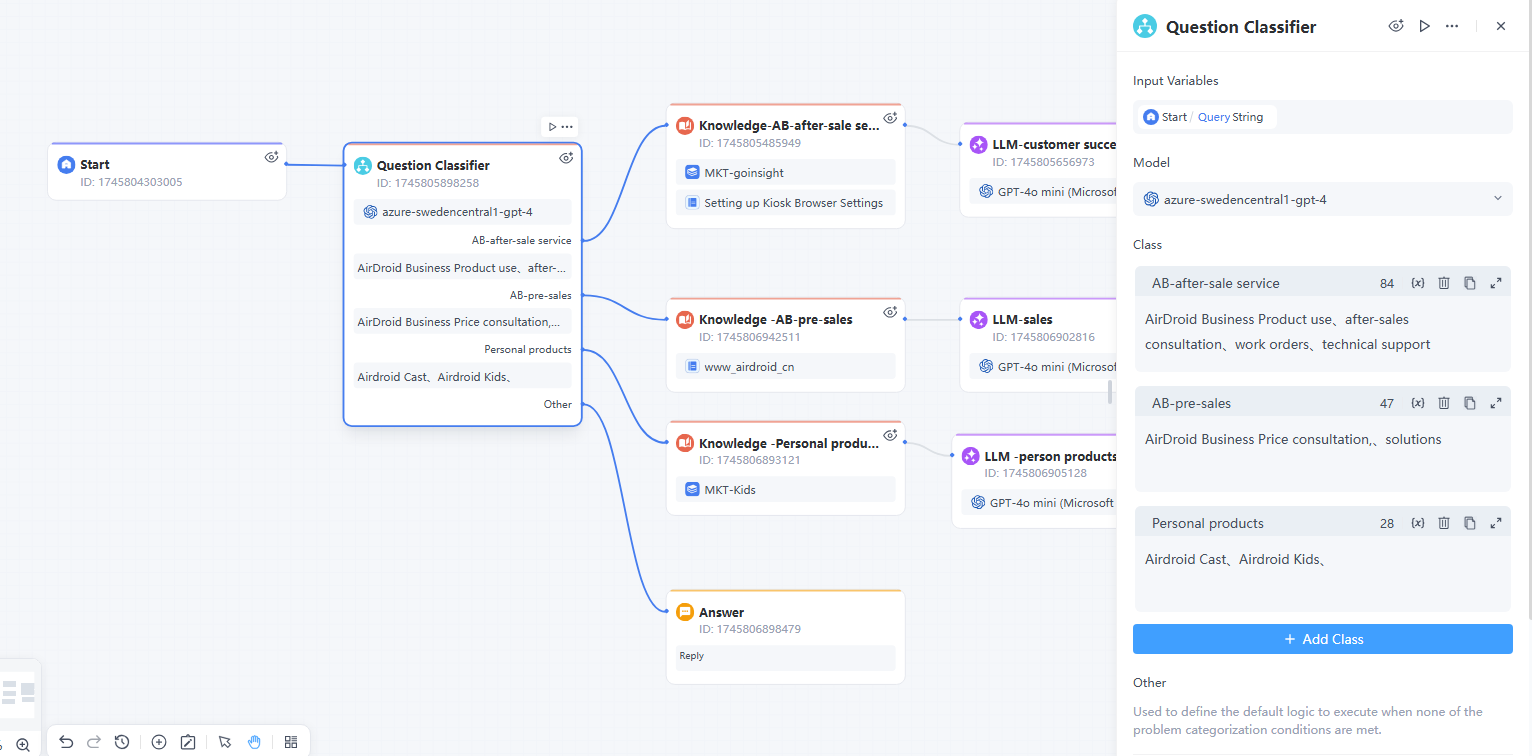
When users enter different questions, the question classifier will automatically complete the classification according to the set classification tags/descriptions. For example, if the user enters:
- "How much does AirDroid Business Enterprise Edition cost?" → Goes to “Pre-sales” classification.
- "How to create and deploy a kiosk configuration?" → Goes to "After-sales” classification
- "How to cast AirDroid Cast to TV?" → Classify it as "Personal product-related issue"
- "What's the weather like in New York today?" → Goes to "Other issue"
Note:
- The input variable must be a string and it cannot be an empty question.
- Each classification name must be different. Don’t use duplicate or invalid names.
- Keep each classification description clear and concise to allow the Classifier to make correct judgements.


Leave a Reply.