Definition
The Iteration node is used to repeatedly execute a set of nodes within a workflow.
When a task requires applying the same processing logic to multiple objects, you can use the Iteration node. You can add child nodes inside the Iteration node, and the system will run these child nodes multiple times according to the specified iteration rules.
Common scenarios include:
- Generating follow-up emails for a group of customers one by one
- Generating usage reports for a group of devices one by one
- Checking the status of a group of orders one by one
- Summarizing a group of documents one by one
- Processing multi-line text line by line
- Querying data by pages and processing the results page by page
A single run of the Iteration node supports up to 60 iterations. If the data to be processed exceeds 60 items, it is recommended to split the data first or control the processing quantity in a preceding node.
Iteration Modes
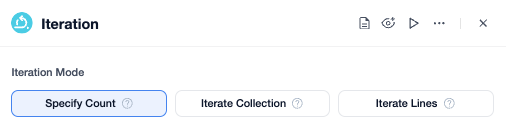
The Iteration node supports three iteration modes: Specify Count, Iterate Collection, and Iterate Lines.
Specify Count
Specify Count means repeating the iteration for a set number of times.
For example, if the iteration count is set to 5, the nodes inside the iteration will execute 5 times.
This mode suits scenarios with a fixed number of executions, such as generating exactly 5 pieces of content or performing 3 fixed checks.
In Specify Count mode, the current iteration's Item changes with the iteration count: in the 1st iteration, Item is 1; in the 2nd iteration, Item is 2, and so forth.
Iterate Collection
Iterate Collection is used to process data of type Array.
This Array usually comes from the output variable of a preceding node. For example, a preceding node may query a list of customers, devices, or orders, or parse out a list. After the Iteration node selects this Array variable, it will iterate through the elements in order.
The number of elements in the array typically equals the number of iterations, but a single run supports up to 60 iterations.
For example, a preceding node outputs a customer list:
[
  {
    "name": "Alice",
    "email": "alice@example.com"
  },
  {
    "name": "Bob",
    "email": "bob@example.com"
  }
]
After the Iteration node selects this customer list as the input variable, it will execute 2 iterations:
- 1st iteration: Item is Alice's customer information.
- 2nd iteration: Item is Bob's customer information.
Inside the iteration, the LLM node can reference the current iteration's Item to generate email content for the current customer, analyze customer needs, or perform other processing logic.
Iterate Lines
Iterate Lines is used to process multi-line text.
The system splits the text by lines, with each line serving as an iteration element and processed once per iteration.
For example, the input content:
a@example.com
b@example.com
c@example.com
The Iteration node will execute 3 iterations, processing one email address per iteration.
In Iterate Lines mode, the current iteration's Item is the current line of text.
This mode is suitable for data where each line represents one object, such as email lists, keyword lists, task lists, etc.
Iteration Built-in Variables
Within the Iteration node, child nodes can use built-in variables provided by the iteration.
| Variable | Type | Description |
|---|---|---|
| Item | String / Number / Object, etc. | The data carried into the current iteration |
| Counter | Number | The current iteration number |
| Continue | Bool | Whether the current iteration should continue |
Item is the most commonly used variable in the iteration, representing the data being processed in the current round.
The meaning of Item varies by iteration mode:
- Specify Count: in the 1st iteration, Item is 1; in the 2nd iteration, Item is 2, and so on.
- Iterate Collection: Item is the current element in the array.
- Iterate Lines: Item is the current line of text.
Counter indicates which iteration the process is currently on.
Continue is a Bool variable indicating whether the current iteration should continue.
Iteration Output
Nodes inside the iteration may produce results in each round.
If you want to unify and use these results after the iteration ends, you can configure the variables to be collected in "Iteration Output".
For example:
- Generating one email per iteration, then getting a list of emails after the iteration ends.
- Analyzing one device per iteration, then getting a list of device analysis results after the iteration ends.
- Summarizing one document per iteration, then getting all summaries after the iteration ends.
After configuring iteration output, the system aggregates the specified variables' results from each round into an array for subsequent nodes after the Iteration node to use.
Ending Iteration
Inside the iteration, you can add an End Iteration node to end the entire iteration prematurely.
When the workflow reaches an End Iteration node, the iteration immediately ends regardless of any remaining rounds or unprocessed data; no further rounds will be executed.
This node is often used together with a condition node to stop the iteration early when a certain condition is met.
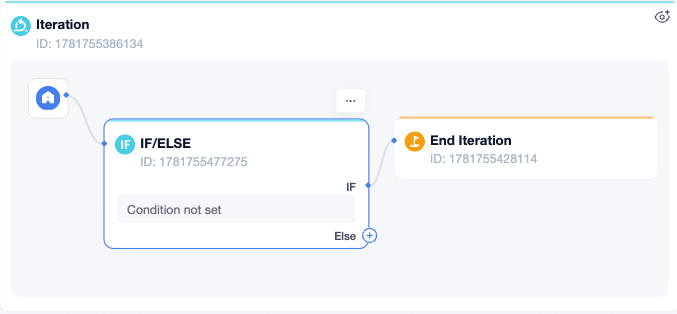
For example, when querying paged data, you can first set a large iteration count to request data page by page. Each round queries one page and judges whether the current page is the last page.
- If not the last page, continue to the next round.
- If it is the last page, enter End Iteration to end the iteration early.
This way, even if the iteration count has not reached the limit, the system will not continue executing unnecessary subsequent paged queries.
Error Response Method
The Iteration node supports configuring an error handling method to decide how to handle errors when a given round fails.
| Method | Description |
|---|---|
| Terminate on Error | When an error occurs in any round, terminate the Iteration node and output the error information |
| Remove Error Output | Ignore the erroring item, continue processing subsequent elements, and keep only the normal results in the final output |
If each round's task is critical, it is recommended to use "Terminate on Error".
If it is a batch processing task where some objects are allowed to fail, you can use "Remove Error Output".
Output Variables
The Iteration node outputs the following variables:
| Variable | Type | Description |
|---|---|---|
| Loops | Number | Total number of iterations |
| Elements | Number | Number of output elements; if multiple outputs are configured, takes the largest element count |
| Custom Output Variables | Array[…] | Variables configured in "Iteration Output", e.g., Text Array[String] |
Custom output variables come from the "Iteration Output" configuration.
For example, inside the iteration, an LLM node generates email content, and this content is configured as an iteration output. After the iteration ends, the Iteration node outputs an array of email contents, with each element corresponding to the result generated in one iteration.
Example
Suppose the sales team needs to generate follow-up emails for a group of customers.
- A preceding node outputs a customer list, including customer name, email, and follow-up background.
- The Iteration node selects the "Iterate Collection" mode and uses the customer list as the input variable.
- Each iteration extracts one customer, and the
Frequently Asked Questions


Leave a Reply.