Pause & Resume Node
The Pause & Resume node is used to pause a workflow and resume it once the specified conditions are met.
It supports two major scenarios:
- Time-based Waiting: Pause execution for a specific duration or until a specified time.
- Human interaction: Pause execution until a user submits a form, cancels it, or the form times out.
Resume Method
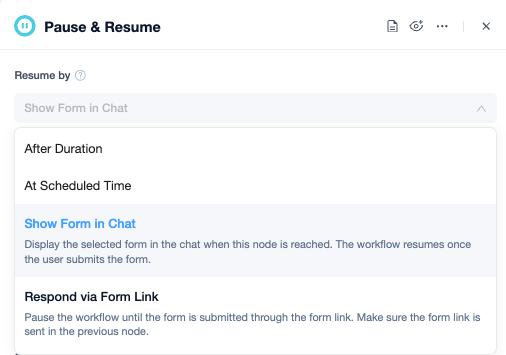
The Pause & Resume node supports multiple resume methods:
| Methods | Requires Form | Use Case |
|---|---|---|
| After Duration | No | Delay execution, e.g. wait 30 minutes before checking the status again |
| At Scheduled Time | No | Resume at a scheduled time, e.g. send reminder at 9:00 AM the next day |
| Show Form in Chat | Yes | Collect additional information from the user in the current chat window |
| Respond via Form Link | Yes | Send the form link to external users via email, Slack, or other channels for them to complete |
Associated Form
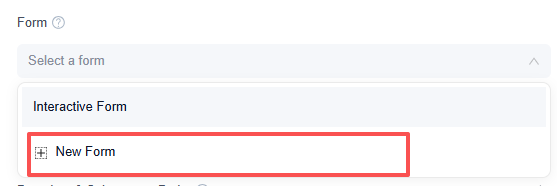
When you select a form-based resume method, you’ll need to associate a form with it.
Two methods are currently supported:
- Select a form created by an upstream Interactive Form node.
- Create a new form directly within the Pause & Resume node.
If the form requires complex fields, layouts, or access verification configured in advance, you can first create it using the Interactive Form node, then reference it in the Pause & Resume node. For simple data collection, it can be created directly within the Pause & Resume node.
Timeout Limit
Form-based resume methods support timeout configuration of up to 72 hours.
- If the user submits the form within the timeout period, the workflow enters the Completed branch.
- If the timeout is exceeded, the workflow enters the Timeout branch.
Branches & Subsequent Paths
The Pause & Resume node routes the workflow to different branches based on the actual result.
| Branches | Description |
|---|---|
| Completed | Entered when the user submits the form, or when the waiting period ends |
| Timeout | Entered when the form remains unsubmitted after the set time limit |
| Canceled | Entered when the user clicks Cancel or abandons the form |
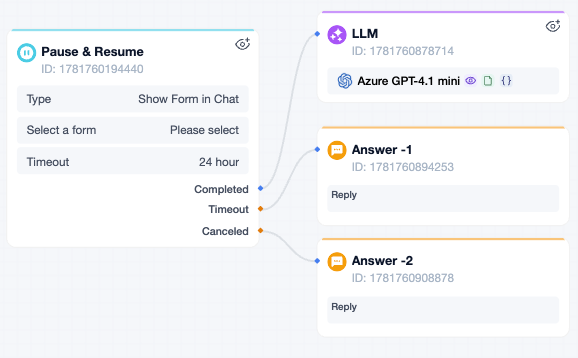
For example, in a leave approval form, if the approver selects "Disagree" and submits the form, the form status is still "Completed." If you need to branch the workflow based on "Agree" vs. "Disagree," use a IF/ELSE node after the Pause & Resume node to evaluate the form field value.
Output Variables
The output variables depend on the resume method you select.
- Time-based methods (After Duration or At Scheduled Time): typically produce no form output variables.
- Form-based methods (Show Form in Chat or Respond via Form Link): once the user submits the form, the field values become available as output variables for downstream nodes to reference.
Usage Examples
Example 1: Collecting Additional Information in the Current Conversation
In a customer support workflow, a user reports a device issue but does not provide the device model or screenshots.
Here’s how the workflow can be designed:
- The AI detects that required information is missing.
- An Interactive Form is generated with fields for device model, issue description, and contact information.
- In the Pause & Resume node, select Show Form in Chat as the resume method.
- The user fills out and submits the form in the chat.
- The workflow resumes and continues processing using the submitted field values.
This approach works best when the user needs to provide information right away.
Example 2: Approval via a Form Link
After an employee submits a leave request, it goes to their supervisor for approval.
Here's how the workflow can be designed:
- The workflow generates an approval form.
- The form link is sent to the supervisor via email or Slack.
- In the Pause & Resume node, select Respond via Form Link as the resume method.
- The workflow pauses and waits for the supervisor to respond.
- The supervisor opens the link, approves or rejects the request, and submits the form.
- The workflow resumes.
- A IF/ELSE node then routes the workflow based on the supervisor’s approval decision.
This approach is a good fit for manual approval processes that are cross-channel, asynchronous, and long-running.


Leave a Reply.