What Is $ABEvent?
$ABEvent contains information such as device details, trigger reasons, and automation execution results when an AirDroid Business alert is triggered. You can use this information to perform subsequent AI analysis and execute more complex automation processes.
Preparations Before Use
Before you begin configuration, please confirm the following conditions:
- Your account has access to AirDroid Business and GoInsight.AI
- You have permissions to configure alerts in AirDroid Business
- You have permissions to view/execute the target workflow in GoInsight.AI
- The target workflow is a Service Workflow and its status is Published
The Complete Configuration Process from AirDroid Business to GoInsight.AI
Step 1: Create or validate a service workflow in GoInsight.AI
- Go to GoInsight.AI and create a service workflow (or open an existing workflow).
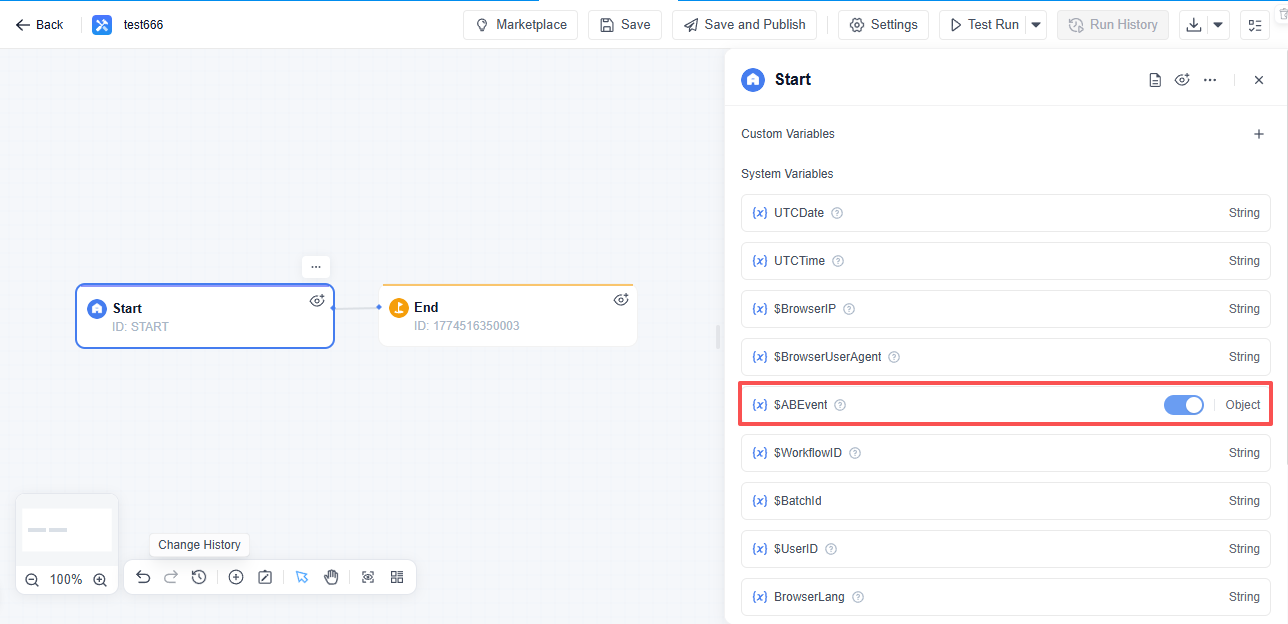
- At the start node, confirm that the system variable $ABEvent is included.
- Enable the variable and publish the workflow.
If $ABEvent is not enabled, the workflow can still be triggered, but the full alert context information cannot be obtained.
Step 2: Create/edit alert rules in AirDroid Business
- Access "Alerts & Workflows" in AirDroid Business.
- Create a new alert or edit an existing alert.
- Select "Trigger GoInsight.AI"
- Select the target workflow in "Trigger GoInsight.AI".
Step 3: Save and apply
- Click "Confirm" to save the alert rules.
- When a device triggers an alert, the system will automatically initiate the associated GoInsight.AI workflow.
- If multiple workflows are associated, they will be triggered simultaneously.
What Information Will $ABEvent Obtain?
After enabling $ABEvent, the workflow can retrieve complete alert context information. This is commonly used for:
- Identify the type of event that triggered this alert and when it occurred
- Locate the corresponding device and group information
For details on the fields, please refer to the appendices at the end of this document:
- Appendix: Overview of Basic Fields
- Appendix: Overview of Variables for Each Alert Type
Common Usage Examples
Example 1: Automatic Low-Battery Notification to the On-Call Group
Scenario: When a device’s battery level falls below a threshold, a notification is automatically sent to the company’s instant messaging or ticket system.
Available fields:
- device_name: Identifies the specific device
- event_type: Identifies the type of event triggered
- trigger_time_utc: Provides the time the event was triggered
Achievable effects:
- This information can serve as input context for AI, helping it determine event priorities and appropriate handling methods.
- After you configure the corresponding processing node, you can generate more complete and readable notification content.
Example 2: Automatic Handling of Offline Devices
Scenario: When a device goes offline, a high-priority ticket is automatically created and handled promptly by the operations team.
Available fields:
- device_name: Identifies the specific device
- group_path: Used to locate the organization path where the device resides
- trigger_time_utc: Used to record the exact trigger time
Achievable effects:
- This information helps the AI determine the scope of impact and generate more accurate handling instructions.
- After configuring the corresponding handling nodes, it can be used to generate ticket content and retain tracking information.
Common Problems and Troubleshooting
Why is the workflow list empty?
Please check first:
- Is the target workflow a service workflow
- Has the workflow been published
- Do you have the relevant permissions for this workflow
Why was the workflow triggered, but the expected fields were not retrieved?
Please check first:
- Has the $ABEvent been enabled in the GoInsight.AI workflow start node
- Do the field names within the workflow match those in the document (e.g., trigger_time_utc)
Why was the GoInsight.AI workflow not executed after the alert was triggered?
Please check first:
- Has the alert rule been saved, and has “Trigger GoInsight.AI” been selected
- Is the target workflow currently still in the "Published" status
- Does the current account still have the relevant permissions for this workflow
Appendix: Overview of Basic Fields
Alarm message
| Variable Name | Meaning |
|---|---|
| alert_id | Alarm ID |
| alert_name | Alarm Name |
| event_type | Alarm event types |
| trigger_log_id | Trigger Log ID |
| trigger_time_utc | Trigger time |
Equipment information
| Variable Name | Meaning |
|---|---|
| device_id | Device ID |
| device_name | Equipment Name |
| device_type | Equipment type |
| group_id | Device group ID |
| group_name | Group name of the device |
| group_path | Device location group path |
Automated action result
| Variable Name | Meaning |
|---|---|
| workflow_id | Automated Action ID |
| workflow_action | Automated Action |
| workflow_trigger_result | Action execution result |
| workflow_trigger_result_info | Supplementary explanation of action execution results |
Appendix: Overview of Variables for Each Alarm Type
| Alert Type (event_type) | Variable Name | Meaning |
|---|---|---|
| Battery charge status | charge_status | Monitored charging status |
| Battery charge status | current_charge_status | Actual charging status at the time of trigger |
| Battery Capacity | battery_threshold_percent | Battery capacity threshold (%) |
| Battery Capacity | current_battery_level_percent | Actual battery level at the time of trigger (%) |
| Battery Temperature | temperature_threshold_celsius | Temperature threshold (°C) |
| Battery Temperature | current_temperature_celsius | Actual temperature at the time of trigger (°C) |
| Online Status | monitored_status | Monitored online status |
| Online Status | current_online_status | Actual online status at the time of trigger |
| Insufficient storage | storage_threshold_mb | Storage threshold (MB) |
| Insufficient storage | current_storage_mb | Actual available storage at the time of trigger (MB) |
| Device Cellular Data Usage | data_period | Statistical period (Daily / Monthly) |
| Device Cellular Data Usage | data_threshold_mb | Data usage threshold (MB) |
| Device Cellular Data Usage | current_data_usage_mb | Actual data usage at the time of trigger (MB) |
| App Running Status | app_package | Monitored app package name |
| App Running Status | app_name | App name |
| App Running Status | monitored_app_status | Monitored app status |
| App Running Status | current_app_status | Actual app status at the time of trigger |
| Biz Daemon Permission | permissions | Monitored permission items |
| Biz Daemon Permission | current_permission_status | Permission status at the time of trigger |
| External HDMI Status | monitored_hdmi_status | Monitored HDMI status |
| External HDMI Status | current_hdmi_status | Actual HDMI status at the time of trigger |
| Device motion status | monitored_motion_status | Monitored motion status |
| Device motion status | duration_seconds | Duration (seconds) |
| Device motion status | current_motion_acceleration_ms2 | Acceleration at the time of trigger (m/s²) |
| Kiosk | monitored_kiosk_status | Monitored Kiosk status |
| Kiosk | current_kiosk_status | Actual Kiosk status at the time of trigger |
| Screen lock | monitored_screen_status | Monitored screen lock status |
| Screen lock | current_screen_status | Actual screen lock status at the time of trigger |
| SIM Card Placed/Removed | monitored_sim_event | Monitored SIM event |
| SIM Card Placed/Removed | sim_event | Triggered SIM event |
| SIM Card Placed/Removed | sim_slot | SIM slot information |
| SIM Card Placed/Removed | current_sim_status | Actual SIM status at the time of trigger |
| SIM Card Placed/Removed | sim_imsi | SIM card IMSI |
| SIM Card Placed/Removed | notify_on_reinsert_of_removed_sim | Whether "Alert when the removed SIM card is reinserted" is enabled |
| SIM Card Placed/Removed | removed_sim_was_reinserted | Whether the removed SIM card has been reinserted |
| Foreground App Status | app_package | Monitored app package name |
| Foreground App Status | app_name | App name |
| Foreground App Status | monitored_foreground_status | Monitored foreground status |
| Foreground App Status | current_foreground_status | Actual foreground status at the time of trigger |
| App Cellular Data Usage | app_package | Monitored app package name |
| App Cellular Data Usage | app_name | App name |
| App Cellular Data Usage | data_period | Statistics period (Daily / Monthly) |
| App Cellular Data Usage | data_threshold_mb | Data usage threshold (MB) |
| App Cellular Data Usage | current_data_usage_mb | Actual data usage at the time of trigger (MB) |


Leave a Reply.