
- Why Traditional Ticket Management Fails at SLA Prevention
- How AI Can Help Proactively Avoid SLA Breaches
- How to Build an AI-Driven SLA Breach Prevention System
- Step 1: Connect Your Ticketing System
- Step 2: Set Up LLM-Powered Ticket Analysis
- Step 3: Calculate Breach Risk Scores
- Step 4: Configure Automated Escalation
- Build Your SLA Breach Prevention Workflow with GoInsight.AI
- FAQs
- Next Step
Imagine this: a customer submits a high-priority support ticket after their payment system fails during peak hours. Minutes pass—no response. The ticket sits unassigned in the queue, and by the time an agent picks it up, the response-time Service Level Agreement (SLA) is already breached.
This scenario is more common than expected: industry benchmarks show that about 12% of support conversations exceed SLA targets, and breached tickets can lead to 22% lower customer satisfaction compared to those handled on time.
Even with modern service desk tools, delays still occur. This raises a critical question: why do traditional ticket management processes continue to fall short?

Designed by Magnific.com
Why Traditional Ticket Management Fails at SLA Prevention
If you've lived through a scenario like the one above, you already know something is broken. But it's important to understand exactly why traditional ticket management systems often struggle to prevent SLA breaches, because the solution needs to address these root causes, not just add more dashboards.
1. Manual Triage Can't Scale
When ticket volume spikes, agents are forced to make rapid-fire priority decisions. They skim subject lines, glance at descriptions, and move on. In that rush, a critical issue disguised as a routine request slips through. The math is simple: if an agent spends 15 seconds per ticket and 200 tickets arrive in an hour, there's no time for careful analysis. High-priority tickets get buried not because agents are careless, but because the volume makes careful triage impossible.
2. SLA Rules Are Too Complex to Remember
Most organizations don't have a single SLA. They have a matrix: different response times for VIP vs. standard customers, different resolution windows for critical vs. minor systems, different rules for business hours vs. weekends. Multiply customer tiers by issue categories by contract types, and you get dozens of SLA permutations. No agent can hold all of that in their head while triaging at speed. The result is inconsistent prioritization, and inconsistency is where breaches hide.
3. Escalation Is Reactive, Not Predictive
Traditional ticketing systems send alerts after an SLA is breached—or at best, when the deadline is minutes away. By then, it's often too late to recover. The assignee might be in a meeting, on PTO, or simply overwhelmed with other urgent work. A system that only reacts to breaches (instead of predicting them) puts your team in perpetual firefighting mode.
4. Priority Judgments Vary by Agent
Two agents looking at the same ticket may assign different priorities. One might interpret "system slow" as P3; another might dig deeper and realize it's P1. This inconsistency isn't a training problem, it's a human limitation. Without a standardized, automated layer of analysis, your SLA performance depends on which agent happens to pick up the ticket.
How AI Can Help Proactively Avoid SLA Breaches
The pain points above share a common thread: they all stem from human cognitive limits, such as limited attention, inconsistent judgment, and reactive workflows. AI addresses each of these directly, not by replacing support teams, but by giving them a smarter first line of defense.
1. Intelligent Identification
Instead of relying on customers or rushed agents to set priority, AI reads the full ticket context. Natural language models analyze content, detect urgency signals, and cross-reference customer attributes to surface what's truly critical, even when the ticket description understates the problem.
2. Proactive Prediction
AI doesn't wait for a breach to happen. By continuously evaluating time elapsed, queue depth, and issue complexity, it calculates a dynamic risk score and flags tickets before they cross the danger zone.
3. Automated Escalation
When risk rises, the system acts. Alerts route to the right people through the right channels without waiting for someone to notice a flashing dashboard.
4. Consistent Judgment
Every ticket is evaluated against the same criteria, regardless of which agent is on shift or how busy the queue is. This eliminates the variance that causes some critical tickets to slip through.
5. Explainable Decisions
When leadership asks why a ticket breached or why it was escalated, the AI provides a clear audit trail: which signals it detected, what score it assigned, and what actions it triggered.
Comparison Table: Traditional ticket management vs. AI-driven ticket system
| Capability | Traditional ticket management | AI-driven ticket system |
|---|---|---|
| Priority assignment | Manual, inconsistent | Automated, context-aware |
| Breach detection | After the fact | Predictive, real-time |
| Escalation | Reactive alerts | Proactive multi-channel |
| Decision consistency | Varies by agent | Uniform standards |
| Audit trail | Limited or manual | Built-in explainability |
With these capabilities in place, the next question is practical: how do you actually build this system?
How to Build an AI-Driven SLA Breach Prevention System
Here's the good news: you don't need a machine learning team or months of data preparation to get started. With today's large language models (LLMs) and AI automation platforms, you can build a working SLA breach prevention system in a matter of days, sometimes even hours.
Step 1: Connect Your Ticketing System
The first step is to connect your ticket system to retrieve the necessary data so that the AI can analyze them. Most modern ticket systems support webhooks, which means they can automatically push data to an external URL whenever a ticket is created or updated. Once your ticket system is connected to the AI automation platform, every new ticket flows into your workflow in real time.
What Data to Capture
When a ticket arrives, your workflow should capture a standard set of fields. You'll use these both for AI analysis and for calculating breach risk:
| Field | Why It Matters |
|---|---|
| Ticket ID | Unique identifier for tracking and updates |
| Title & Description | The main text the LLM will analyze |
| Customer Name & Tier | VIP customers may warrant automatic priority boosts |
| Category / Product Area | Helps identify if it's a core system issue |
| Created Timestamp | Needed to calculate how much SLA time has elapsed |
| SLA Response Deadline | The clock you're racing against |
| SLA Resolution Deadline | The final deadline for full resolution |
Step 2: Set Up LLM-Powered Ticket Analysis
Once a ticket arrives in your automation workflow, the next step is to send it to an LLM for intelligent analysis. The LLM's job is to read the ticket like an experienced support manager would, looking beyond the surface to understand the real urgency.
The AI analysis produces three key outputs:
- Recommended Priority (P1-P4) — The AI's assessment of appropriate urgency
- Complexity Estimate (Simple / Medium / Complex) — How long this is likely to take to resolve
- Risk Signals — Specific phrases or factors that influenced the judgment
Designing an Effective Prompt
The quality of your AI analysis depends heavily on how you instruct the LLM. A well-designed prompt should include:
- A clear role definition
- Explicit priority criteria
- Keyword signals
- Business rules
- Structured output format
Here's a prompt template you can adapt for your organization:
# Role
You are a senior IT service desk supervisor with 10+ years of experience
triaging support tickets. Your job is to determine the appropriate priority
level for each incoming ticket based on its content and context.

# Task
Analyze the following ticket and provide:
1. A recommended priority level (P1, P2, P3, or P4)
2. An estimated complexity (Simple, Medium, or Complex)
3. Key risk signals you identified

# Priority Definitions
- **P1 (Critical):** Core business completely down; revenue or large user
  populations directly impacted
  - Signal phrases: "outage," "can't access," "all users affected,"
    "transactions failing," "data loss"
- **P2 (High):** Important functionality degraded; workarounds exist but
  significantly impact efficiency
  - Signal phrases: "some users," "severe slowness," "errors on key feature"
- **P3 (Medium):** General issue; does not block core business processes
  - Signal phrases: "intermittent," "single user," "minor module"
- **P4 (Low):** Questions, feature requests, or non-urgent matters
  - Signal phrases: "how do I," "suggestion," "would be nice," "when will"

# Business Rules
- If customer tier is VIP or Strategic, automatically elevate priority by
  one level (e.g., P3 → P2)
- If the affected system is in the critical list (payments, authentication,
  order processing), elevate by one level
- If the ticket mentions escalation ("my manager is asking," "second time
  reporting"), flag for immediate attention

# Ticket Information
- Title: {{title}}
- Description: {{description}}
- Customer Tier: {{customer_tier}}
- Category: {{category}}

# Output Format (JSON)
{
  "recommended_priority": "P1/P2/P3/P4",
  "complexity": "Simple/Medium/Complex",
  "priority_reason": "One sentence explaining the priority decision",
  "risk_signals": ["signal 1", "signal 2"],
  "requires_immediate_attention": true/false
}
How to Use the AI Recommendations
There are two ways to deploy the AI's priority judgment:
Suggestion Mode (Recommended for starting out)
- AI assigns a recommended priority and displays it to the agent
- Agent reviews and can accept or override
- System logs whether agent agreed or changed the recommendation
- Great for building trust and gathering data on AI accuracy
Auto-Assignment Mode
- AI assigns priority directly without agent review
- Agents can still override if needed, but AI decision is the default
- Best for high-volume teams once AI accuracy is proven
Either way, the AI dramatically speeds up triage and catches tickets that might otherwise slip through the cracks during busy periods.
Step 3: Calculate Breach Risk Scores
Priority alone isn't enough to prevent breaches. A P2 ticket that just came in has plenty of time, but a P3 ticket that's been sitting in the queue for 3 hours might be about to breach. You need a dynamic risk score that considers both urgency and time pressure.
Here's a straightforward approach that you can implement:
Risk Score = Base Score + Time Urgency + Complexity Factor + Resource Pressure

Where:
├── Base Score (by priority):
│   ├── P1 = 40 points
│   ├── P2 = 25 points
│   ├── P3 = 10 points
│   └── P4 = 5 points
│
├── Time Urgency:
│   └── (Time Elapsed ÷ Total SLA Window) × 40 points
│       Example: 90 minutes elapsed out of 120-minute SLA
│                → (90/120) × 40 = 30 points
│
├── Complexity Factor:
│   ├── Simple = 0 points
│   ├── Medium = +10 points
│   └── Complex = +20 points
│
└── Resource Pressure:
    ├── Queue depth > 20 tickets = +10 points
    └── Outside business hours = +10 points
This formula produces a score from 0 to 100+. In practice, most tickets will fall between 10 and 90. Once you have a risk score, map it to action tiers that your automation will use to decide what to do:
| Risk Score | Level | What It Means | Recommended Action |
|---|---|---|---|
| 0–30 | 🟢 Low | On track, no concerns | Log AI assessment; no notification |
| 31–50 | 🟡 Medium | Worth monitoring | Send email reminder to assignee |
| 51–70 | 🟠 High | Likely to breach without intervention | Slack/Teams alert @assignee + supervisor |
| 71–100 | 🔴 Critical | Almost certain to breach | Phone call + immediate escalation to L2 |
The beauty of this approach is that it's proactive. Instead of finding out about a breach after it happens, you're getting alerts while there's still time to act.
Step 4: Configure Automated Escalation
Now it's time to wire everything together in your AI automation platform. The workflow receives tickets, runs them through LLM analysis, calculates risk scores, and then branches into different escalation paths based on the risk level.
Here's the logical structure:
┌─────────────────────────────────────────────────────────────────────────┐
│                        AI Automation Workflow                           │
│                                                                         │
│   ┌──────────────┐     ┌──────────────┐     ┌──────────────┐            │
│   │   Trigger    │──── │  LLM Node    │──── │  Calculate   │            │
│   │  (Webhook)   │     │  (Analyze)   │     │  Risk Score  │            │
│   └──────────────┘     └──────────────┘     └───────┬──────┘            │
│                                                     │                   │
│                        ┌────────────────────────────┼────────────┐      │
│                        │              │             │            │      │
│                        ▼              ▼             ▼            ▼      │
│                   ┌────────┐    ┌────────┐    ┌────────┐    ┌──────┐    │
│                   │ Low    │    │ Medium │    │ High   │    │ Crit │    │
│                   │ Risk   │    │ Risk   │    │ Risk   │    │ Risk │    │
│                   │        │    │        │    │        │    │      │    │
│                   │ Log    │    │ Email  │    │ Slack  │    │ Call │    │
│                   │ only   │    │ alert  │    │ + bump │    │ +L2  │    │
│                   └────────┘    └────────┘    └────────┘    └──────┘    │
│                        │              │             │            │      │
│                        └──────────────┴─────────────┴────────────┘      │
│                                          │                              │
│                                          ▼                              │
│                               ┌──────────────────┐                      │
│                               │  Update Ticket   │                      │
│                               │  (write back)    │                      │
│                               └──────────────────┘                      │
└─────────────────────────────────────────────────────────────────────────┘
Writing Back to the Ticketing System
After the AI makes its assessment and the workflow takes action, you'll want to update the original ticket so your support team has visibility. Typically, you'd write back:
- The AI-recommended priority (as a custom field or internal note)
- The calculated risk score
- A list of the risk signals the AI identified
- Any actions the system took (e.g., "Auto-escalated to L2 due to high breach risk")
This creates an audit trail and helps agents understand why certain tickets were flagged or prioritized.
Build Your SLA Breach Prevention Workflow with GoInsight.AI
Once you have a clear grasp of the entire process, you can start putting it into practice, and that’s when a powerful platform can help you achieve twice the results with half the effort.
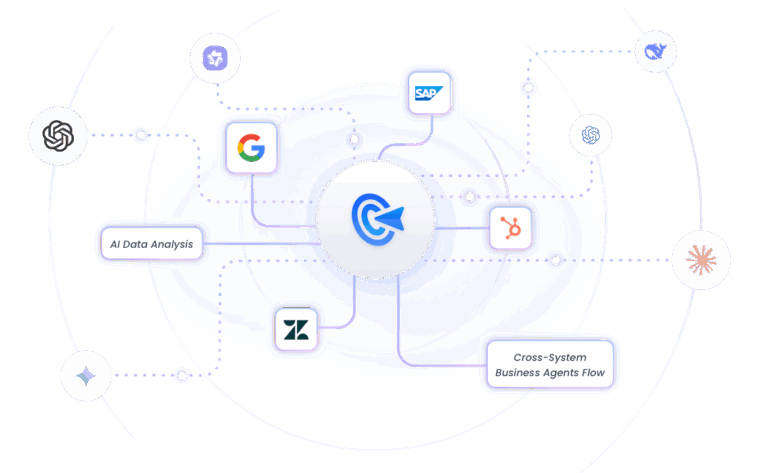
As an AI-native workflow automation platform, GoInsight.AI lets you build, deploy, and manage intelligent agents without writing code. It combines the reasoning power of large language models with a visual workflow builder, pre-built integrations, and enterprise-grade controls, so teams can automate complex processes like SLA breach prevention in hours instead of weeks.
Key Capabilities:
- Pre-built connectors: The apps you'll need, such as Zendesk, Jira, Slack, Teams, and more. Authorize once, and ticket data flows in automatically.
- Native LLM integration: Use enterprise-grade and various mainstream models, such as Microsoft Azure OpenAI, OpenAI, and Anthropic, directly within your workflows.
- Visual workflow builder: With drag-and-drop nodes and a built-in prompt generator, you can build and iterate your entire breach prevention flow without writing code, and view it at a glance.
- Flexible human-in-the-loop controls: Start in suggestion mode where agents review AI recommendations, then gradually shift to auto-assignment as confidence grows. You decide how much autonomy the AI gets.
FAQs
Next Steps
You don't need perfect data or a custom-trained model to take action. With off-the-shelf LLM capabilities and an automated workflow you can set up in an afternoon, you can start reducing SLA breaches as early as next week.
The key is to start now. Every day you wait is another potential breach, another frustrated customer, another fire drill. Begin with suggestion mode, prove the value, then expand.
And If you want to skip the complex steps and get started faster, platforms like GoInsight.AI provide everything you need, so you can build your workflows seamlessly.
Ready to tackle manual ticket bottleneck?
See how GoInsight.AI enables teams to build AI automation workflows without needing complex technical skills.





Leave a Reply.