
- Background
- Challenges & Pain Points
- The "Quiet" Loss: The Problem of Data Decay
- The Administrative Trap of the "Passive CRM"
- The 700-Minute Daily Drain at Sand Studio
- Selection & Solution
- One Lead at a Time: Here’s how it works
- Results & Benefits
- The Team's Own Words
- Reusability for Other Teams
- What's Next
Highlights
- • B2B sales teams lose revenue when high-value leads go cold. Manually reviewing CRM history and drafting follow-ups drains time from active deals.
- • An automated lead reactivation workflow using GoInsight.AI that connects Google Sheets and HubSpot to process leads, check timelines, and generate rep-specific emails.
- • Reactivates 60-70 leads daily, saving 700 minutes of manual labor, equivalent to the workload of two full-time sales assistants.
Background
Sand Studio is a global B2B software company that develops enterprise products like AirDroid and GoInsight.AI. The sales team manages a high volume of inbound inquiries and complex sales cycles across multiple time zones.
In this enterprise environment, the team's revenue goals rely heavily on how well they manage a specific group of buyers: stalled, high-value prospects.
The sales floor operates under three distinct realities regarding these dormant users:
- The "Quiet" High-Value Deal: Enterprise buyers, such as IT administrators and operations managers, often evaluate software over long periods. They frequently go silent due to internal delays or busy schedules. These are not lost deals; they are simply paused, holding massive potential revenue.
- The Need for Reactivation: The company cannot afford to wait for these buyers to return on their own. Actively contacting and waking up these dormant, high-value users is a critical requirement for hitting quarterly sales targets.
- The Demand for Context: You cannot re-engage a senior IT director with a generic marketing template. Successfully reactivating these specific users requires highly personalized, one-to-one communication based on past conversations.
Challenges & Pain Points
The problem Sand Studio faces is not uncommon; it reflects a structural flaw in the modern B2B sales industry. Sales teams consistently suffer revenue losses because they cannot effectively track and connect with stagnant leads. This flaw stems primarily from two factors: the rapid decay of sales channel data and the heavy management burden of traditional CRM platforms.
The "Quiet" Loss: The Problem of Data Decay
Business data is highly perishable. It acts like fresh inventory that goes bad over time. Industry research shows that B2B contact data decays at an average rate of roughly 22.5% to 30% per year. The "Quiet" Loss: The Problem of Data Decay
- Job Changes: Key decision-makers leave the company or move to different departments.
- Budget Freezes: Internal priorities shift, causing the company to pause software purchases.
- Competitor Actions: Rival companies step in and offer alternative solutions while your deal is paused.
- Company Mergers: Organizational restructurings completely change the buying process.
When a prospect goes silent, the lead actively loses value every single day. If a sales team tries to find these lost leads by doing a manual pipeline review at the end of the month, they are operating on expired data. By the time a sales representative manually digs up a lead that has been silent for 90 days, the buying window is almost always closed.
The Administrative Trap of the "Passive CRM"
The second major issue is how modern sales operations use their technology. Most companies treat their CRM platform as a passive digital filing cabinet. It holds critical data, but requires manual human effort to do anything useful. This creates a severe administrative trap:
- Low Selling Time: According to the Salesforce State of Sales report, sales representatives spend an average of only 28% of their week actually selling.
- High Administrative Burden: The remaining 72% of their time is consumed by tasks like updating data fields, logging activities, and searching for past notes.
- The Pipeline Sunk Cost: Companies pay premium salaries for negotiation skills, but the technology stack forces these employees to do basic data entry.
When sales managers tell their team to "follow up with old leads," they accidentally make this problem worse. Digging through old CRM records to figure out who needs an email pulls the best salespeople away from active, high-intent buyers.
The 700-Minute Daily Drain at Sand Studio
Sand Studio experienced this exact operational bottleneck on the sales floor. The team consistently identified thousands of high-value prospects that had suddenly stopped replying. These were active buyers evaluating the software who just went dark. Simply ignoring them meant throwing away guaranteed revenue.
However, trying to wake up these dormant users manually was a terrible process. For every single one of those thousands of leads, a sales representative had to go through a very specific, manual checklist:
1. First, open HubSpot and search for the specific company.
2. Scroll through the activity timeline to read the past meeting notes to understand the specific context of the deal.
3. Check the exact date of the last sent email and the last received email.
4. Calculate the exact number of days that have passed. The representative must ask: Is it too soon to follow up? Will another email annoy them? Has it been too long?
5. Open a new draft and write an email that references the past conversations. The email must look like a natural continuation of the old thread to avoid looking like spam.
6. Send the email, then go back into HubSpot or a shared Google Sheet to manually log the activity so the team knows the follow-up happened.
On average, this entire manual procedure takes 10 minutes per lead. If you do the math for the daily volume of 60 to 70 leads, the result is alarming. The sales team was spending 700 minutes—almost 12 hours—every single day just trying to restart old conversations.
This massive time drain hurt the rest of the business. Every minute spent digging through HubSpot to find a stalled lead was a minute stolen from an active negotiation. The team reached a breaking point. They either had to ignore the stalled pipeline and lose the revenue, or they had to sacrifice their active deals to do the manual administrative work.
Selection & Solution
To solve this problem, Sand Studio knew they could not just hire more sales assistants. Adding more people to do manual data entry is expensive and fails to fix the root cause of the inefficiency. They also refused to use standard email marketing automation tools. Putting high-value enterprise buyers into a generic, automated email sequence damages the company's brand and ruins email deliverability scores.
Instead, the team decided to use their own low-code platform, GoInsight.AI, to build a custom, automated reactivation engine.
The main goal of this workflow was strict, intelligent control. The system needed to copy the exact analytical process of a senior sales representative. It had to be smart enough to know when not to send an email, and it had to write emails that sounded like real human beings. The sales team built a targeted automated workflow called One Lead at a Time by connecting a series of specific tool nodes.
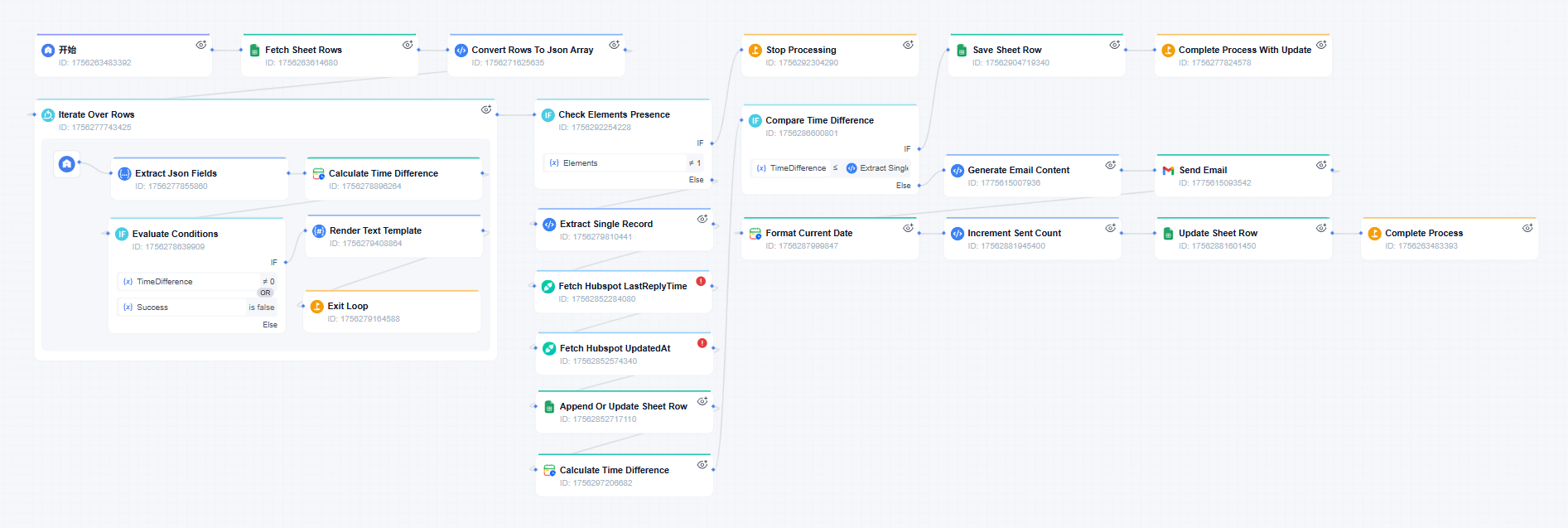
One Lead at a Time: Here's how it works
- Step 1. The Google Sheet Trigger and Single-Item Processing
- The workflow starts with a very simple entry point. The sales representatives use a basic Google Sheet to list the target clients they want the system to monitor. This gives the team a clear, visual list of all stalled leads.
- Step 2. Smart CRM Integration and the Logic Gate
- After the system extracts one lead, it needs to make an active decision. It uses a HubSpot API node to connect directly to the CRM database. The system searches for the specific customer and pulls their activity history.
- Specifically, it looks for the exact timestamp of the very last conversation. It takes that timestamp and feeds it into a "Time Difference" condition node. This node calculates exactly how many days and hours have passed since Sand Studio last spoke to the prospect.
- This calculation acts as a smart logic gate. The team sets a specific time rule. If the time elapsed is too short, the workflow stops processing that lead immediately and moves on to the next row in the sheet. This prevents the system from accidentally spamming a client who just replied yesterday. It protects the relationship and ensures the company maintains a highly professional communication schedule.
- Step 3. Rep-Specific Routing and Authentic Email Generation
- If the logic gate decides that enough time has passed to safely follow up, the workflow moves to the email generation phase. This is where the system completely replaces the manual human effort.
- The workflow uses a multi-branch selection node to figure out exactly who owns the account. It checks the data to see if the lead belongs to the sales representative whose name has already been recorded.
- Once it identifies the owner, it routes the information down a specific path to a dedicated AI Agent node built for that exact person. These agents do not use generic text blocks. The agent for Amy is trained specifically on Amy's past successful emails, her personal tone of voice, and her usual closing lines.
- The AI agent analyzes the client's industry, company size, and previous HubSpot notes. Then, it writes a completely new email draft that matches Amy's exact writing style. The generated text looks and sounds exactly like a real message typed out by Amy. This guarantees the email feels like a natural one-to-one conversation.
- Step 4. Automated Logging and Team Alignment
- After the AI agent generates the text and sends the email through the connected email tool node, the workflow executes the final administrative step.
- It uses an "Append or update row in sheet" node to go back to the original Google Sheet. It updates the row to show that the email was sent successfully and logs the exact time. The sales team can open the sheet at any time and see exactly who received an email and who was skipped. Nobody has to type a single manual update to keep the team aligned.
Results & Benefits
Putting this GoInsight.AI workflow into action changed how the Sand Studio sales floor operates. By letting the system handle the data gathering, the time calculations, and the email drafting, the company saw immediate, hard results.
Massive Scale for Dormant Leads
The system handles the reactivation volume perfectly. It successfully tracks and processes 60 to 70 high-value stalled leads every single day. Because it calculates the time delay automatically, it never makes a mistake and emails someone too early.
Recovered Sales Time
The biggest result is the raw time saved. The workflow completely eliminated the 10-minute manual checklist for every single lead. This saves the team exactly 700 minutes of manual labor every 24 hours. The sales representatives reclaimed almost 12 hours of their collective day. They stopped doing administrative CRM work and started using that time to hold more product demonstrations and negotiate active contracts.
Zero-Cost Headcount Expansion
From a business perspective, building this zero-code workflow gave Sand Studio the exact same daily output as hiring two full-time sales assistants, but without spending any money on new salaries.
The Team's Own Words
The reaction from the sales floor proves how much value this targeted automation brings to a daily routine. A representative from the Sand Studio Sales Team noted:
"This workflow is incredibly effective. It saves a massive amount of time. It is exactly equivalent to hiring two dedicated sales assistants who understand our business. We do not have to think about checking the old pipeline anymore; the system just does it for us."
Reusability for Other Teams
Is this difficult to replicate? The core logic is straightforward. Read a list. Check CRM history. Decide whether to send. Generate a message in a rep's style. Process everything one record at a time. Any team with a CRM and an email system can adapt it. The integration layer, connecting those two systems, is the only prerequisite.
The automation is available as a template inside GoInsight.AI. Other teams do not need to build from scratch. They connect their accounts, adjust a few settings, and can have a working reactivation process running the same day.
Bring your team, systems, and AI into one place, then turn ideas into automated works.
Start Free TrialWhat's Next
The immediate priority is closing the measurement loop. When a silent lead does reply, the system should detect it and notify the original rep, ideally placing that lead directly onto their calendar for a follow-up conversation. That turns "we reached out" into "we restarted a conversation," with data to support it.
For Sand Studio's sales team, the larger takeaway has been clear. Lead reactivation matters. Manual reactivation does not scale. Automation that respects a rep's voice and a lead's context makes the impractical routine. And when something becomes routine, it actually happens every day.
Conclusion
The success of this internal case study highlights a major shift happening in the broader B2B sales industry. Sales teams can no longer afford to rely on static databases if they want to hit their revenue targets. To stay competitive, companies need to move from a "System of Record" to a "System of Action."
Having a CRM that just stores names and dates is completely insufficient. Sales operations must connect their databases to intelligent workflow engines. When automation handles the heavy lifting of calculating timelines, reading past context, and drafting authentic emails, it stops high-value pipeline data from decaying. This approach guarantees that human sales professionals can spend 100% of their working hours on the final negotiations that actually close deals and generate revenue.





Leave a Reply.