- The Hidden Costs of Manual Ticket Triage
- What Is AI Ticket Triage? (And Why It's a Game-Changer)
- Case Study:How CS Team Reduced Requester Wait Time by 80%
- The Background
- The ChallengeThe Solution
- The Implement & Routing Logics
- The Results
- How to Automate Ticket Triage: A Step by Step Playbook
- Step 1: Define Your Goals
- Step 2: Create a Tagging Taxonomy
- Step 3: Implement Routing Logic
- Step 4: Measure & Refine
- Conclusion
It's quarter-end, and your support inbox is overflowing: urgent payment issues, and a flood of routine questions all arrive at once. But it's not just volume that slows your team—it's the chaos of manual ticket triage. When every minute counts, sorting tickets by hand means critical cases wait, SLAs slip, and customer frustration grows.
According to Gartner, traditional IT service management (ITSM) ticket triage is labor-intensive and drives up average resolution times. Their research shows that adopting AI can automate ticket categorization and prioritization, accelerating routing and boosting support efficiency.
In this environment, automating ticket triage with AI isn't just a nice-to-have—it's becoming essential for any support operation aiming to scale, control costs, and delight customers.
The Hidden Costs of Manual Ticket Triage
The Problem in Numbers
Longer Response Times: Slow replies frustrate customers who expect near-instantaneous service, especially in today's fast-paced environment.
Rising Cost per Ticket: Manual triage adds hidden labor costs to each ticket. Sorting tickets by subject, department, or complexity often requires multiple touches from support staff, inflating average handling time (AHT). This approach drives up the overall cost of serving each customer.
Higher Customer Churn: When tickets go unanswered or misrouted, customers lose confidence. Studies indicate a direct correlation between subpar support experiences and churn—disappointed users are more likely to cancel subscriptions, request refunds, or even share negative reviews online.
Beyond the Numbers
Not all burdens show up on spreadsheets. Manual triage also impacts support culture, efficiency, and a company's ability to grow sustainably.
- 1.Agent Burnout: Repetitive tasks—especially sorting through hundreds or thousands of tickets a day—erode morale. Your talented support agents signed up to solve real problems, not act as traffic police. Over time, boredom and fatigue lead to high turnover rates, further compounding training and hiring costs.
- 2.Inconsistent Prioritization: Humans inevitably make errors, particularly when under pressure. VIP customers with pressing issues may slip through the cracks, or urgent updates might languish in lower-priority queues. Lapses like these tarnish relationships and hamper brand reputation.
- 3.Scalability Ceiling: Every company experiences growth spurts. Upscaling your customer support by simply hiring more staff to sort tickets isn't always viable. Budget constraints, limited office space, or insufficient training resources can create a bottleneck. Manual processes form constraints that hinder your ability to handle surges in support volume—imagine a holiday shopping season or a major product launch.
By acknowledging these hidden costs, the need for an efficient, automated ticket triage strategy becomes impossible to ignore. Faced with these challenges, support teams have turned to AI to streamline and scale.
What Is AI Ticket Triage? (And Why It's a Game-Changer)
AI ticket triage is a method of using intelligent algorithms to automatically sort, categorize, prioritize, and route incoming Zendesk tickets to the right person or team—immediately upon arrival. Think of it as having a digital gatekeeper that reads and interprets each request in real time, then assigns it where it needs to go.
Core AI Technologies Involved
Natural Language Processing (NLP): This branch of AI helps machines understand the nuances of human language within tickets—recognizing key phrases, extracting context, and even sensing sentiment.
Machine Learning (ML): Through ML, the system finds patterns in historical ticket data to make predictions and recommendations. Over time, it "learns" from feedback and gets more accurate at categorizing new tickets.
Intent Recognition: This technology identifies the user's main purpose. For instance, is the customer complaining about a billing error, requesting a refund, or asking for product guidance? Intent recognition helps the AI sort tickets by the actual reason behind each message.
Sentiment Analysis: Not all tickets need the same level of urgency. Sentiment analysis deduces if a message is written in anger, panic, or delight. This insight can help route angry or emergency messages to an escalation team or highlight feedback from particularly happy customers that might become brand advocates.
When combined, these four capabilities empower an AI triage system to interpret each ticket holistically—classifying it with remarkable speed and precision.
The Key Benefits
- 1.Slash First Response Time (FRT): Instead of waiting hours or days for manual sorting, AI-based triage routes tickets within seconds. Faster triage means agents can focus on sending that all-important first response—boosting your metrics and your customers' confidence.
- 2.Increase Agent Efficiency: Let AI do the triage grunt work, freeing human agents to tackle complex queries. Support staff spend more time problem-solving and less time scanning ticket subject lines.
- 3.Improve Customer Satisfaction (CSAT): Quicker, more accurate resolutions lead to happier customers who feel supported and heard. Positive experiences not only boost loyalty but often turn customers into brand advocates.
- 4.Reduce Operational Costs: By automating tasks previously handled by multiple FTEs, you cut down on overhead, reinvest those resources in agent training, or scale into new support channels without blowing up your budget.
In short, AI ticket triage serves as the nexus of speed, quality, and economy—a compelling proposition for any support-heavy operation.
Case Study: How CS Team Reduced Requester Wait Time by 80%
The Background
To bring these concepts to life, let's look at a real-world scenario. Fast-growing SaaS businesses face a constant challenge: delivering seamless customer support at scale across multiple products and channels, without sacrificing speed or quality. For SandStudio, Zendesk acts as the unified hub for all support workflows—spanning embedded product feedback, help center requests, and inbound emails from every product line.
With ticket volumes averaging over 2,000 per week—and surges during product launches or peak cycles—the team found that manual triage and translation could no longer keep pace. As a result, critical requests risked delays, and rising backlogs threatened both user satisfaction and operational efficiency.
- Company: Sand Studio (Customer Support Team)
- Industry: SaaS / Technology
- Use Case: Automatically triage, translate, and process prioritized support tickets.
- Key Outcome: 80%+ reduction in user wait times; 2x increase in ticket processing throughput
The Challenge
Scaling customer support presents challenges, particularly when manual ticket processing becomes inefficient in high-volume scenarios. Standard support workflows often fail to address the unique complexities of managing multi-channel, multi-language tickets, leading to compromised user experiences and operational inefficiencies. The team faced several key challenges:
- Manual Sorting Overload: Manually reviewing each ticket is a time sink. Agents spend hours scanning subject lines and deciding if an inquiry is about payment, security, or product details.
- Manual Translation Bottleneck: Many incoming tickets arrived in multiple languages, requiring agents to translate each message by hand before even beginning to resolve the issue. This not only delayed response times but also created a backlog that made it impossible to deliver timely support.
- Missing High-Priority Tickets: Among a large queue of day-to-day issues, urgent or high-value tickets can slip through the cracks. A "platinum-tier client" might be upset about an undelivered shipment, but if that ticket is buried under dozens of routine queries, you risk losing a key customer.
- Invalid and Unclear Tickets Drain Resources: A significant portion of tickets turned out to be duplicates, spam, or lacked enough information for action. Agents were forced to review every ticket manually, spending valuable time on cases that required no intervention. This constant triage of non-actionable tickets pulled attention away from genuine customer needs.
"Too often, we'd open a ticket only to find it was unclear or irrelevant, but each one still ate up precious minutes. The real worry was that critical issues like payment or security could slip through unnoticed. Sometimes, by the time we finally replied, the user had already given up or solved the problem elsewhere—making all that effort feel pointless."
Manual processes could not keep up. The main issue was not the Zendesk platform, but the lack of AI ticket support automation for sorting and processing tickets. Without streamlined workflows, even normal volumes quickly turned into backlogs and inconsistent service.
The Solution
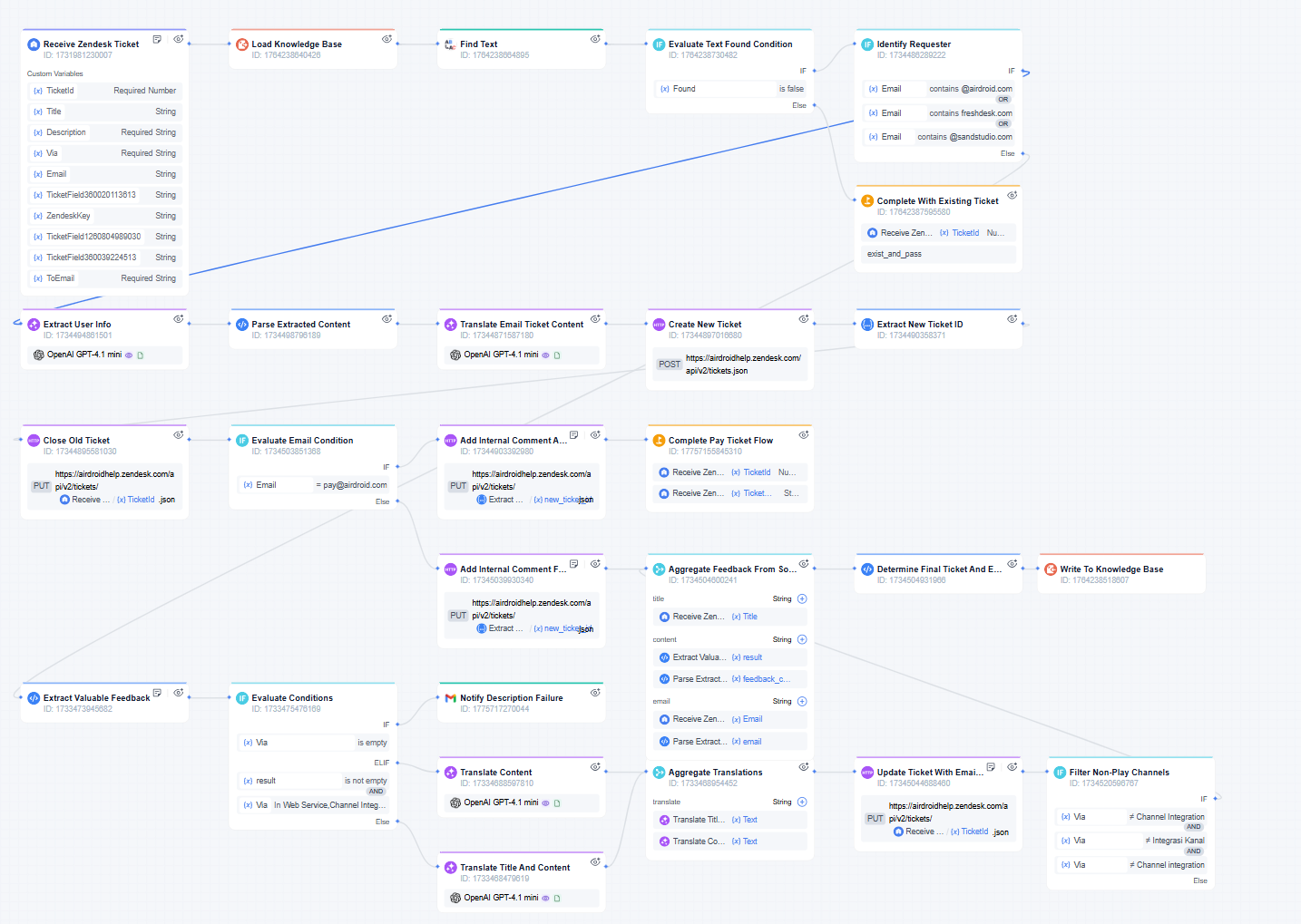
Determined to create a more responsive, resilient support operation, the team adopted GoInsight.AI to automate the entire Zendesk ticket intake and triage process. Rather than layering on rigid rules, they built a flexible workflow that could handle the real-world messiness of customer inquiries—across languages, channels, and formats. This streamlined automation speeds up support, reduces manual work, and ensures critical information is never lost.
- Integration: They connected their Zendesk instance to the new platform via secure API.
- Automated Extraction & Translation: The system identifies the requester type, extracts key info with LLMs, and cleans feedback before translating core content into Chinese.
- Smart Ticket Routing& Handling: Each ticket is checked for duplicates—if found, processing stops immediately; new tickets are created and linked as needed, with automated prioritization for urgent cases.
- Human-in-the-Loop Step: For each new ticket, the platform automatically classified and routed it. If the system's confidence fell below 80%, a senior support rep received a notification to validate the categorization.
Here's how the workflow operates in practice:
- When a new ticket lands in Zendesk, the workflow springs into action: it instantly checks for duplicates (based on requester, topic, and recent activity) and extracts key details from the content.
- The system automatically scans each ticket for high-priority signals—such as payment or security concerns—and flags these cases for immediate attention, ensuring they are escalated and resolved without delay.
- If the ticket is in another language, the workflow auto-translates the feedback into clear, standardized English, ensuring every agent and product manager can quickly understand the core issue, no matter its origin.
- Based on the ticket's source and content, the system decides whether to update an existing case, create a new one, or close out duplicates—always logging internal notes for traceability.
Implement Routing Logics
a. Pre-Process & Enrich
Handle tasks that shape or “clean up” the ticket data before final triage:
- Automated Translation: If your company serves multiple regions, autodetect the ticket’s language and translate it into a single language (e.g., English) for internal handling. Attach the translation to the Zendesk ticket so any agent can read it.
- Duplicate Detection: By analyzing email addresses, subject lines, or timestamps, the system identifies repeated or identical requests. You can auto-close duplicates or merge them under a single main ticket to reduce clutter.
b. Create Routing Rules
After pre-processing, you apply your taxonomy logic:
- Tagging: The AI or rules engine assigns relevant tags, such as “billing-issue” or “critical.”
- Prioritization: If the ticket mentions “payment failure” or if the user is an enterprise customer, the system marks it urgent.
- Assignment: Finally, the workflow funnels the ticket to the relevant agent group or senior manager.
Building these routes may sound complex, but modern orchestration tools (like GoInsight.AI) offer drag-and-drop, low-code editors to set up multi-step flows.
Below is a quick illustration of how AI-driven triage might parse and route a single ticket:
• Example Ticket
- – Subject: "Can't login"
- – Body: "Hey, my password isn't working, I'm totally blocked. This is urgent."
- – Customer Tier (from CRM): "Enterprise"
• AI Analysis Output
(Imagine the system has read the ticket, identified its intent, and assigned a confidence score, sentiment, and urgency flag.)
{ "intent": "Password Reset", "confidence": 0.98, "sentiment": "Negative", "urgency_detected": true, "entities": ["password"], "customer_data": { "tier": "Enterprise" } }
IF confidence > 0.95 AND intent == "Password Reset"
→ ROUTE to Tier 1 Tech Support Group
AND IF customer_data.tier == "Enterprise" OR urgency_detected == true
→ SET PRIORITY to Urgent
In practice, as soon as this ticket arrives, the AI recognizes the high confidence level (0.98) for a password reset. Because the user is classified as an Enterprise customer and urgency_detected is true, the rule automatically flags it for immediate attention. This prevents the ticket from languishing in the general queue and ensures the customer receives rapid, high-priority support.
The Results
Within weeks, our automated workflow transformed Zendesk from a manual, backlog-plagued system into a scalable support hub. The measurable impact was evident across quality, efficiency, and business value:
| Metric | Before | After |
|---|---|---|
| Average Triage Time | 5–10 min per ticket | 1–2 min per ticket |
| Duplicate Ticket Rate | 8–15% | 1–3% |
| Agent Updates | Avg. 200 - 300 updates | Avg. 400 - 500 updates |
| End-user Updates | Avg. 150 - 250 updates | Avg. 250 - 400 updates |
| Requester Wait Time (hrs) | High fluctuation, 100 - 250 hrs | Stabilized around 50 hrs |
The automated Zendesk workflow delivered substantial, measurable improvements across all key support metrics:
- 80%+ reduction in Requester Wait Time: Average wait time dropped from 4–10 days (100–250 hours) to under 2 days (less than 50 hours), directly addressing the most critical user pain point.
- 2x increase in ticket throughput: The team scaled up to handle surging ticket volumes without expanding headcount, eliminating manual backlogs.
- Sharp decrease in manual intervention: Agents were freed from repetitive triage and translation tasks, driving a significant boost in productivity.
- Continuous optimization through data: The workflow generated operational data that feeds back into process refinement, enabling ongoing efficiency gains and quality improvements.
Notably, these gains were achieved without increasing team size, transforming Zendesk from a manual bottleneck into a resilient, data-driven support engine.
"With automation in place, we saw a dramatic drop in manual intervention—our support team can now handle far more tickets, which directly optimizes labor costs. At the same time, the faster ticket flow and shorter resolution cycles have made our entire business more agile, enabling us to iterate and respond to customer needs much more quickly than before."
How to Automate Ticket Triage: A Step by Step Playbook
Having seen how a real-world company overcame its ticket overload, it's time to explore how you can achieve similar results. Whether you're just starting your automation journey or looking to refine an existing system, these steps will guide you from defining clear objectives to deploying AI-powered triage solutions tailored to your unique business challenges.
Step 1: Define Your Goals (What's Your North Star?)
Most E-commerce support initiatives falter because they start with scattered desires: "Let's just cut response times." Instead, zero in on clear, measurable objectives that align with your overall strategy.
- Specific and Measurable: Instead of "improve efficiency," go for something like "reduce the first reply time for VIP customers from 8 hours to 2 hours in Q3."
- Business-Relevant: Consider strategic priorities. Are you trying to boost repeat sales, enhance loyalty, or reduce escalations? Let that shape your targets.
- Time-Bound: Commit to a deadline. It injects urgency and accountability.
Pro Tip: Align your triage improvements with marketing or brand initiatives. If you're rolling out a new line of luxury goods, for example, your triage goals could revolve around prioritizing these premium queries to deliver a white-glove experience.
Step 2: Create a Tagging Taxonomy (The Language of Your Support Ops)
A well-defined taxonomy ensures that everyone—live agents, AI engines, or rule-based triggers—speak the same language when categorizing tickets.
Why It Matters
- Streamlines reporting.
- Enhances the effectiveness of automation rules.
- Reduces confusion among agents.
Below is a sample table to illustrate how tags might be organized in an E-commerce setting:
| Tag Category | Example Tags | Purpose |
|---|---|---|
| Intent | sales-inquiry, billing-question, bug-report | Routes tickets to specialized teams (Sales, Finance, Tech). |
| Sentiment | urgent, angry-customer, positive-feedback | Helps prioritize tickets needing immediate attention or identifies potential fans. |
| Customer Tier | vip-client, repeat-customer, guest-checkout | Aligns support level with customer lifetime value; ensures VIP or frequent buyers get top-tier service. |
Creating a Logical Hierarchy: Your tags should be descriptive yet concise. For instance, "billing-question/refund-request" might be a subtag that clarifies the nature of the billing question. Keep an eye on complexity: too many tags can be as bad as too few because it becomes harder to maintain consistency.
Ongoing Maintenance: Remember that your taxonomy isn't static. Update tags whenever you introduce new product lines, services, or shipping methods. Periodically audit tags to retire old ones no longer relevant to your evolving business.
Step 3: Implement Routing Logic
At this stage, you've chosen your approach; now it's time to build the system that routes tickets from "raw queue" to "assigned group or agent." Think of it as creating a funnel:
- 1.Initial Filtering:
- Rules for Common Patterns: Instantly label or reassign tickets that clearly match a well-defined pattern. Examples: "Package Lost," "VIP Refund Request," "Credit Card Declined."
- Auto-Categorization: For known triggers—like subject lines containing "Tracking Number" or "Product Return"—route them to specialized departments.
- 2.AI-Driven Analysis:
- The AI reads the full text of the ticket, identifies keywords and intent, checks sentiment, and either assigns a Confidence Score or picks a top "intent" category.
- When the Confidence Score crosses a certain threshold (say 90%), it auto-assigns the ticket to the relevant support group. Otherwise, it flags the ticket for a quick manual review or a second pass rule.
- 3.Customer Data Integration:
- Use data from your CRM or marketing tools to identify the user's purchase history, loyalty tier, or subscription level. If they're a "VIP" or "frequent returns" user, escalate or route them accordingly.
- Example logic: IF (Customer: Tier = 'Silver' OR 'Gold') AND (Category = 'Damaged Item') THEN PRIORITY = 'High'.
- 4.Set Fail-Safes:
- Escalation: If an agent hasn't picked up or replied to a ticket within a certain timeframe, automatically reassign or ping a manager.
- Human-in-the-Loop: For uncertain classifications (Confidence Score under 75%, for instance), a designated team or senior agent finalizes the routing.
- 5.Workflow Documentation:
- Keep a diagram or flowchart so new agents understand the triage logic. Document who "owns" which triggers or AI configurations. This pays dividends in maintaining clarity during turnover or expansions.
Step 4: Measure & Refine
A ticket triage system is only as good as its performance metrics. You need to track how effectively your solution meets the goals set in Step 1.
- Key Metrics:
- First Reply Time (FRT): Your time from ticket creation to the first human or automated response.
- Resolution Time: How quickly issues are fully resolved.
- Customer Satisfaction (CSAT): Gather feedback via post-resolution surveys or net promoter scores (NPS).
- Routing Accuracy: Check how often tickets are misrouted. If misrouting is >5%, fine-tune your triggers or AI model.
- Iterative Improvements:
- If certain categories are frequently mislabeled, review how your triage is handling them.
- Continuously feed corrected labels back into your AI system or refine your rules for edge cases.
- Periodically evaluate if your taxonomy needs updating to reflect your new product lines or marketing campaigns.
Conclusion
Manual triage has served as a bandage in a world where customer expectations are evolving faster than ever. However, responding to a flood of tickets by brute force is no longer sustainable—especially as businesses scale, products diversify, and the sheer volume of requests continues to rise. AI presents a compelling alternative: it can efficiently and inexpensively process thousands of tickets with remarkable speed, all while boosting agent morale and improving customer satisfaction.
Ready to Stop Sorting and Start Solving? Our experts are here to help you evaluate exactly how AI-powered triage would fit into your existing Zendesk or other exsting system or workflows. Whether you want to start small with rule-based triggers or take the leap into fully automated intelligent routing, we'll provide a tailored approach to match your ticket volume, complexity, and budget.
Say goodbye to the chaos of manual triage. Embrace AI automation, empower your agents to focus on high-value customer conversations, and deliver the seamless support experience modern customers demand. Your support team—and your bottom line—will thank you.





Leave a Reply.