

- Why Manual Ticket Classification Breaks at Scale
- What is Automatic Ticket Classification
- How AI Understands Tickets
- The era of keywords: rule-based systems
- The era of patterns: machine learning (ML)
- The era of intent: Large Language Models (LLMs)
- How to Design an AI Ticket Classification System
- Step 1: Design your ticket taxonomy
- Step 2: Define success metrics
- Step 3: Understand your data and system constraints
- Step 4: Connect ticket classification to routing, priority and SLA
- Step 5: Plan the rollout
- Implement Automatic Ticket Classification with GoInsight.AI
- FAQs
Key Takeaways
- Automatic ticket classification uses AI to turn unstructured support messages into structured decisions, including category, priority, and routing.
- Manual triage and legacy keyword systems inevitably break at scale due to semantic ambiguity and inconsistent human judgment.
- Modern support stacks are evolving from rigid rules to LLM-based intent understanding, allowing systems to decode context that keywords miss.
- Accuracy alone is misleading in ticket classification due to imbalanced data; metrics like coverage and cost of errors matter more.
- The objective isn't "better labeling" but reducing Ticket Ping-Pong, shortening resolution times, and creating a predictable, scalable support engine.
"I don't need this product anymore. Can you help?"
To a human agent, the intent behind this message is obvious. But for a keyword-based system, it's a nightmare. Without explicit terms like "refund" or "return," most traditional systems fail to route the request correctly. Is it a cancellation? A complaint? Or a return?
This gap between what customers say and what they actually mean is exactly where manual triage falls short and where automatic ticket classification has become a cornerstone of modern customer support operations.
Whether you are struggling with "ticket ping-pong" or looking to scale your routing, this article breaks down how AI decodes customer intent, how automatic ticket classification works, and how to roll out an automated system step-by-step.
Why Manual Ticket Classification Breaks at Scale
At a small scale, manual ticket triage works, or at least, it feels manageable. An agent can read each incoming request, decide what it's about, assign a category, set a priority, and then route it to the right team. However, as ticket volume increases across various channels, this process quickly becomes a bottleneck.
The hidden cost of pre-work
Manual triage may seem simple, but it creates a significant operational burden. Before an agent can even start solving a problem, they must spend minutes reading, interpreting context, and checking history just to decide where a ticket belongs. When volume surges, your team spends more time sorting tickets than solving them, and the overhead turns triage into a major operational tax.
Fragmented data and inconsistent routing
Human interpretation is subjective. Two agents may categorize the same ticket differently based on their experience, leading to:
- Ticket ping-pong: Reassignments that add hours of delay to resolution times.
- Conflicting priority: Urgent issues are getting buried under low-priority tags.
- Unreliable reporting: Fragmented data that makes it impossible to track accurate support trends.
The scaling paradox
Human intuition cannot process thousands of unstructured requests in real-time. As you grow, the variety of customer language and issue complexity compounds. Manual triage fails at scale, not because of a lack of effort, but because humans cannot consistently manage high-volume, multi-channel data without AI-driven logic.
What is Automatic Ticket Classification
Many describe automatic ticket classification simply as using AI to tag tickets. But in practice, it is the decision layer of your customer support system.
Its core is the process of turning unstructured customer messages into structured signals that your system can act on without human intervention. Instead of relying on rigid keywords, modern AI analyzes the full context to extract:
- Intent: What exactly is the customer trying to achieve?
- Priority & sentiment: how urgent are the issues, and what is the customer’s emotional state?
- Routing: Which specific team or automated queue is best equipped to handle this?
These signals are translated into structured metadata, such as tags or fields, that trigger your download logic from SLA tracking to automated resolutions.
That’s why ticket classification sits at the very beginning of the workflow. Every subsequent action depends on its accuracy. When this entry point is optimized, the entire support system becomes faster, more consistent, and infinitely more scalable.
How AI Understands Tickets
To transform a raw message into an actionable decision, AI must replicate what humans do naturally: interpret meaning from messy, incomplete, or indirect language. To achieve this goal, the technology has evolved through three distinct eras, each offering a higher level of sophistication and autonomy.
The era of keywords: rule-based systems
The earliest automation relies on predefined logic. In general, these systems scan tickets for specific keywords or string patterns using regular expressions (regex). For example, tagging any message containing the word "refund" as a billing issue.
While this logic is fast to deploy, rule-based systems are inherently fragile. They assume customers use predictable language. If a user writes, "I’m unhappy with my recent purchase," but omits the word "refund", the system fails.
Thus, for high-volume and hyper-specific queries with zero ambiguity, rule-based systems work well; however, they cannot handle evolving language or implicit intent.
The era of patterns: machine learning (ML)
Machine learning moves beyond rigid rules by training on historical data. Instead of looking for a specific word, ML models identify statistical patterns by learning while phrases and contexts are typically associated with certain categories.
Through Natural Language Processing (NLP), an ML model can recognize that "I can’t log in" and "My account access is blocked" share the same intent, even with zero keyword overlap.
It makes ticket classification far more flexible and accurate than rules. But it often runs as a black box that requires massive amounts of labeled historical data to remain effective.
The era of intent: Large Language Models (LLMs)
The latest shift is the move toward Large Language Models (LLMs). While the previous generation focuses on pattern matching, LLMs reason through context and introduce a "Semantic Layer" that handles multi-intent tickets, such as a technical bug mixed with a billing complaint. Meanwhile, it provides confidence scoring to tell you when a ticket is too complex for AI and must be escalated to a human.
In a real-world support environment, these strengths make LLMs particularly effective, because messages are often:
- Short, vague, or unstructured
- Written in different tones or languages
- Containing multiple overlapping issues
Now, consider the example mentioned at the beginning: "I don’t need this product anymore."
How the different technologies might process this message?
- Rule-based systems: Fails (no keywords)
- Traditional ML: Assigns a label based on low-confidence probability
- LLM: Correctly infers a return or refund request by understanding the sentiment and the customer’s relationship with the product
Understanding support tickets, however, is only the first step. AI does not run your support operation, but only processes signals. The true challenge is how to translate these raw AI signals into structured categories, routing logic, and SLAs within your system.
Keep reading, the next section will walk you around how to design an AI-powered ticket classification system with a 5-step blueprint.
How AI Understands Tickets
Designing a system of automatic ticket triage is not just about choosing a model, but about building a reliable decision layer that can answer how tickets are structured, how performance is measured, and how classification connects to real workflows.
Here’s a step-by-step framework for you.
Step 1: Design your ticket taxonomy
Start by auditing your existing ticket tags. Export 2-4 weeks of resolved tickets and answer three questions:
- How many unique categories do you actually use?
- How often do tickets get re-tagged or reassigned?
- Do tickets frequently contain multiple issues?
After that, you can choose a hierarchical structure based on different situations.
Use a single-label hierarchy if:
- ≥80% of tickets can be resolved with one primary category
- Reassignment rate is low (10–15%)
- Categories are clearly separated (low overlap)
Use multi-label classification if:
- 20–30% of tickets contain multiple intents
- Tickets are often reassigned between teams
- Categories overlap (e.g. billing + technical issues)
Tips:
- Hierarchical structure (the tree): Tickets follow a nested path, such as Billing > Refund > Double Charge. It's excellent for clean reporting, but can be rigid if an issue fits into two branches.
- Multi-label structure (the hashtags): A ticket can have multiple independent tags, such as #Refund, #Urgent, #DesktopAPP. This structure is more flexible and can more accurately describe the nature and urgency of the problem, making it easier for teams to work on the problem more efficiently.
Step 2: Define success metrics of accuracy, coverage, and cost
After clearing which hierarchical structure to use, it's time to define the success metrics of your AI-powered ticket classification system.
Most teams start with accuracy but often get misled. That's because support ticket data is usually imbalanced (a few categories dominate), so a model can appear "accurate" while ignoring important edge cases.
Here's a list of recommended metrics you can measure in business.
| Metric | What's for | What it can tell | When it's useful | Practical benchmark |
|---|---|---|---|---|
| Accuracy | A baseline | % of correct predictions | Basic sanity check | >80–90% is typical, but not sufficient |
| Coverage | Decide automation level | % of tickets auto-classified with high confidence | Automation readiness |
|
| Cost of errors | Prioritize what matters | Business impact of wrong decisions | Most important in practice | Prioritize high-cost mistakes (e.g., misrouting urgent tickets) |
Step 3: Understand your data and system constraints
Before implementation, perform a data health check.
- The Volume Threshold: For traditional ML, you need at least 500–1,000 labeled examples per category. For LLMs, you can start with "Zero-shot" (no data), but you still need a Golden Dataset (100 perfectly labeled tickets) to test against.
- Latency Requirements: Does your system need to route tickets in real-time (2 seconds) to trigger an auto-responder, or is a 5-minute delay acceptable for batch processing?
- Integration Audit: Ensure your Helpdesk (Zendesk, Salesforce) has a "Write" API that allows the AI to update ticket fields without conflicting with human agent edits.
Step 4: Connect ticket classification to routing, priority, and SLA
In the ticket classification system, once a ticket is classified, the output should trigger an action, whereas the AI insight is valueless.
In this step, map your AI outputs directly to your operational logic, such as:
- Intent-Based Routing: Route #TechnicalBug tickets to Tier 2 Engineering and #Billing to Finance.
- Dynamic Prioritization: If an LLM detects "High Frustration" or mentions of "Legal Action," automatically bump the priority to "Emergency" and shorten the SLA clock.
- Automated Workflows: Use specific tags to trigger "Macro" suggestions or AI-generated drafts for agents, cutting down on handle time.
Step 5: Plan the rollout from manual tagging to AI classification
DON'T move from manual triage to full automation overnight. Instead, rollout a phased approach to build trust:
- Shadow Mode: Run the AI in the background. It tags tickets, but humans don't see them yet. Compare AI tags against human tags to measure accuracy.
- Human-in-the-loop: The AI suggests tags, and agents confirm or correct them with one click. This provides the "feedback loop" the model needs to improve.
- Full Automation: Once the AI reaches your target accuracy (e.g., 90% for "Billing"), allow it to route those tickets automatically, freeing your team for complex problem-solving.
Implement Automatic Ticket Classification with GoInsight.AI
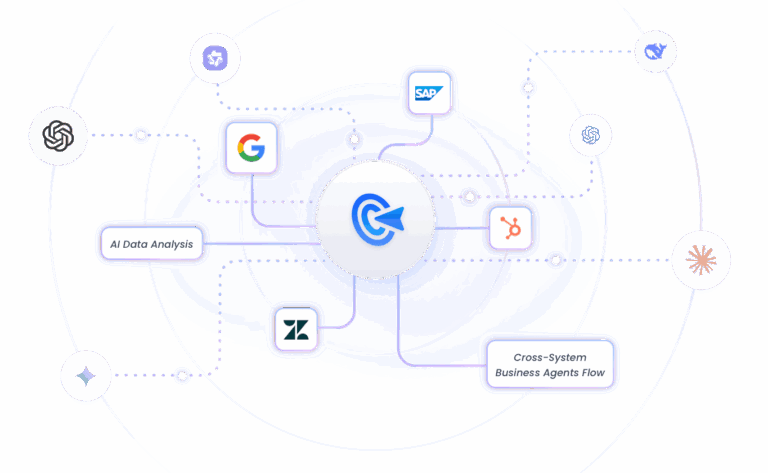
After having a clear idea of how AI works on ticket triage and how to design the ticket classification automation framework, you can start putting it into action with GoInsight.AI, an AI-powered automation and collaboration workbench that can help you develop valuable insights from customer tickets with workflow automation.
With it, you can build and deploy automation solution for ticket classification, and empower the customer support team to access these abilities in team collaboration.
Key Capabilities
- Native LLM integration: Apply mainstream LLMs to analyze and tag customer tickets in a more efficient and accuracy way.
- Collaboration workspace: Allow the whole team to work together with AIs and trigger agents to analyze tickets and get insights.
- Dashboard for cost management: Provide details of adoption inventory, usage hotspots, ROI signals, and reliability trends, to give you a clear view of your ticketing evaluation.
Bring your team, systems, and AI into one place—then turn ideas into governed work.
Automate Ticket Classification NowFAQs





Leave a Reply.