
- The Three Main Types of Automated Email Responses
- How to Choose the Right Automated Email Response System
- How to Implement AI for Automated Email Responses
- Step 1: Identify and Categorize Your Emails
- Step 2: Connect AI to a Structured Knowledge Base
- Step 3: Use AI Drafts with Human Review First
- Step 4: Integrate AI into Your Workflow
- Step 5: Scale Gradually Based on Real Data
- Turn Email Automation into a Scalable System with GoInsight.AI
- FAQs
- Next Steps
Only 13% of emails sent globally are written by humans, meaning most inbox activity today is automated in some form. A typical company today might use multiple types of automated email responses: an out-of-office reply in Gmail, an auto-acknowledgement from a helpdesk platform, and increasingly, AI-generated email responses.
While each serves a different purpose, many teams struggle with a simple question: Which automated email response system should we actually use? This guide breaks down the three main types of automated email responses and explains when each one works best.

Designed by Magnific.com
The Three Main Types of Automated Email Responses
Not all automated email responses work the same way. Broadly speaking, automated email response systems fall into three main categories:
1. Mailbox Auto Replies
Mailbox auto replies are the simplest form of automated email response. They are built directly into email platforms and typically send a predefined message when an email is received.
2. Helpdesk Auto Responses
Helpdesk auto responses are commonly used in customer support systems such as ticketing platforms. Incoming emails are converted into support tickets and processed through structured workflows.
3. AI Email Response Systems
AI-powered email response systems represent a newer approach to email automation. These systems use AI to identify the intent of the message, summarize key information, and generate tailored response suggestions for specific inquiries.
Comparison Table: Mailbox vs Helpdesk vs AI
| Type | Response Capability | Automation Level | Example Tools |
|---|---|---|---|
| Mailbox Auto Replies | Static templates | Basic | Gmail auto reply, Outlook OOO |
| Helpdesk Auto Responses | Rule-based replies | Moderate | Zendesk, Freshdesk |
| AI Email Response Systems | AI-generated responses | Advanced | AI systems like GoInsight.AI |
Quick Summary:
- Mailbox auto replies work best for basic notifications
- Helpdesk automation supports structured support workflows.
- AI systems are better suited for handling complex or high-volume email communication.
How to Choose the Right Automated Email Response System
After understanding the different types of automated email responses, the next question is straightforward: which system is the right fit for your workflow? To make this decision easier, you can use the simple self-assessment below.
Self-Assessment: Evaluate Your Email Automation Needs
| Question | Option | Score |
|---|---|---|
| Q1. What type of emails are you receiving? | Personal or internal emails | 1 |
| Customer support or service requests | 2 | |
| Mixed inquiries (support, sales, partnerships, etc.) | 3 | |
| Q2. How complex are the responses? | Simple notifications or acknowledgements | 1 |
| Standard replies using templates | 2 | |
| Context-dependent or customized replies | 3 | |
| Q3. How much email volume do you handle? | Less than 10 emails per day | 1 |
| 10–50 emails per day | 2 | |
| 50+ emails per day | 3 | |
| Q4. How predictable are the questions? | Almost always the same question | 1 |
| Several recurring topics | 2 | |
| Highly varied or unpredictable inquiries | 3 | |
| Q5. How important is response speed? | Response time isn't critical | 1 |
| Same-day responses are expected | 2 | |
| Near-instant replies are expected | 3 |
After answering all five questions, add up your total score.
Scoring Recommendations:
- 5–7 points: Basic mailbox auto replies are usually sufficient
- 8–11 points: Helpdesk automation is typically a better fit
- 12–15 points: AI automated email response systems become highly valuable
Many modern teams fall into the middle or high range of this spectrum. As email volume grows and inquiries become more varied, basic auto replies often become insufficient.
While traditional automation tools can handle predictable workflows, AI-powered email response systems offer greater flexibility by analyzing incoming messages and generating context-aware replies. For teams dealing with diverse inquiries or higher volumes, AI often becomes the most scalable approach to email automation.
How to Implement AI for Automated Email Responses
After identifying that AI is the right fit for your email workflow, the next step is understanding how to implement it effectively. In practice, successful teams don’t deploy AI all at once. They build it step by step, starting with clear use cases and gradually expanding automation.
Step 1: Identify and Categorize Your Emails
Start by reviewing your inbox and identifying the most common types of emails your team handles. Instead of treating all emails the same, group them based on frequency, complexity, and required response type.
For example:
- High volume, low complexity (e.g., order status, basic FAQs)
- Medium complexity (e.g., billing or product questions)
- High complexity (e.g., complaints, escalations)
This allows you to decide which emails can be auto-replied, which should use AI drafts + human review, and Which should stay fully manual. Without clear categorization, automation often fails because it applies the same logic to very different types of emails.
Step 2: Connect AI to a Structured Knowledge Base
AI is only as reliable as the information it can access. Simply “connecting a knowledge base” is not enough, the structure and quality of that knowledge matter more.
In practice, you should:
- Start by organizing your most important content: FAQs, product documentation, and support playbooks
- Prioritize the top 20–50 questions your team handles most often
- Keep information specific and up-to-date (avoid vague or outdated docs)
- Include real past email replies to capture tone and context
Many teams make the mistake of setting up AI first and fixing knowledge later, but this leads to generic or incorrect responses. A well-structured knowledge base significantly improves response accuracy, even with simpler AI models.
Step 3: Use AI Drafts with Human Review First
Instead of fully automating replies immediately, start with AI-generated drafts that your team can review before sending.
This approach helps you:
- Catch errors or edge cases early
- Adjust tone and wording to match your brand
- Identify gaps in your knowledge base
It also creates a feedback loop, in which every edit your team makes improves future responses. Over time, you can gradually reduce human involvement for specific categories once accuracy is proven.
Step 4: Integrate AI into Your Workflow
AI delivers the most value when it’s embedded into your existing processes rather than being used as a standalone tool.
For example:
- Automatically categorize incoming emails
- Route requests to the appropriate team
- Attach relevant context before generating responses
By connecting these steps, you create a smoother workflow from email intake to resolution, reducing manual handoffs and improving response speed.
Step 5: Scale Gradually Based on Real Data
Once your initial workflows are working reliably, expand automation step by step.
Focus on:
- Where your team still spends the most time
- Which workflows are already stable enough to scale
- Where automation can improve response speed or consistency
This gradual approach helps avoid over-automation while ensuring your system improves continuously over time.
Turn Email Automation into a Scalable System with GoInsight.AI
Once you’ve mapped out how to implement AI in your email workflows, the next step is turning that strategy into something you can actually run and scale.
This is exactly where GoInsight.AI can help. As an AI automation platform, GoInsight.AI enables teams to build structured email automation systems. It combines AI, knowledge, and workflow logic in one place so you can start small and scale over time.
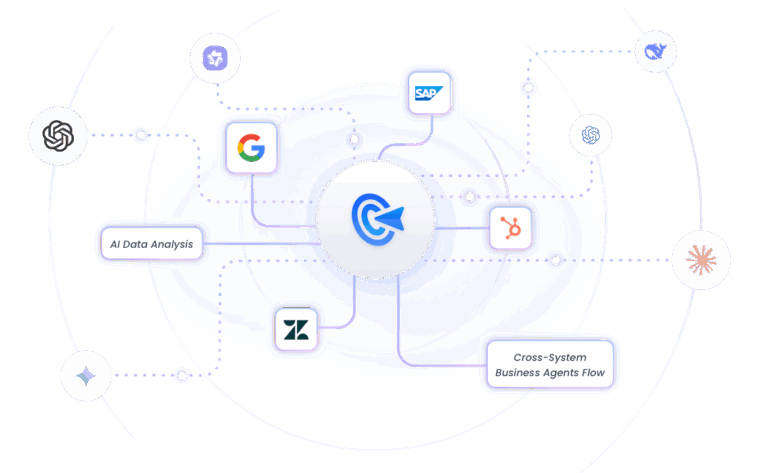
Key Capabilities:
- Versatile AI models: Choose the most suitable AI model depending on the complexity of your email tasks, from simple notifications to context-rich inquiries.
- Knowledge base & RAG: Connect AI to internal documentation, help centers, or historical tickets; RAG-powered responses ensure answers are accurate and up-to-date.
- Human-in-the-loop collaboration: Allow human oversight for critical responses, enabling teams to review or adjust AI-generated replies when necessary.
- System integration: Link AI workflows to CRMs, ticketing systems, or other external platforms for seamless automation across your business processes.
FAQs
Next Steps
If you're considering automating email responses, the next step is to start small and evaluate what type of automation actually fits your team’s needs.
✅ Use the self-assessment table above to evaluate your current email volume, complexity, and response expectations.
✅ Start with ready-to-use workflows to experiment with AI email automation and see how it fits into your daily operations.
The goal isn't to automate everything immediately, but to gradually build a smarter email workflow that helps your team respond faster and focus on more meaningful conversations.
Ready to cut down manual email response work?
See how GoInsight.AI enables teams to build automated workflows without needing complex technical skills.





Leave a Reply.