Executive summary
- Company: Sand Studio (Customer Support Team)
- Industry: SaaS / Technology
- Use Case: Automatically triage, translate, and process prioritized support tickets.
- Key Outcome: 80%+ reduction in user wait times;2x increase in ticket processing throughput
The Background: Why Traditional Ticket Handling Falls Short
Fast-growing SaaS businesses face a constant challenge: delivering seamless customer support at scale across multiple products and channels, without sacrificing speed or quality. For SandStudio, Zendesk acts as the unified hub for all support workflows—spanning embedded product feedback, help center requests, and inbound emails from every product line.
With ticket volumes averaging over 2,000 per week—and surges during product launches or peak cycles—the team found that manual triage and translation could no longer keep pace. As a result, critical requests risked delays, and rising backlogs threatened both user satisfaction and operational efficiency.
To break this bottleneck, SandStudio built a fully automated Zendesk ticket preprocessing workflow. The system automatically translates, filters, and prioritizes tickets, ensuring faster responses and consistent quality—no matter the channel or language.
This case study explores the challenge, solution design, and measurable impact of automating support at scale.
The Challenge: Overcoming Manual Bottlenecks in Ticket Processing
Scaling customer support presents challenges, particularly when manual ticket processing becomes inefficient in high-volume scenarios. Standard support workflows often fail to address the unique complexities of managing multi-channel, multi-language tickets, leading to compromised user experiences and operational inefficiencies. The team faced several key challenges:
- Manual translation of multilingual tickets took too much time. This led to delays and made it hard to respond quickly.
- Many tickets were invalid or unclear. Agents had to check each one, wasting effort on cases that didn't need action.
- Critical issues like payment or security problems were easy to miss. Without fast detection, these could put user trust and business at risk.
- A small team with rising ticket volume meant slower first replies. Users sometimes waited too long and lost interest.
"Too often, we'd open a ticket only to find it was unclear or irrelevant, but each one still ate up precious minutes. The real worry was that critical issues like payment or security could slip through unnoticed. Sometimes, by the time we finally replied, the user had already given up or solved the problem elsewhere—making all that effort feel pointless."
Manual processes could not keep up. The main issue was not the Zendesk platform, but the lack of AI ticket support automation for sorting and processing tickets. Without streamlined workflows, even normal volumes quickly turned into backlogs and inconsistent service.
The Solution: An Automated Preprocessing Workflow for Zendesk
Determined to create a more responsive, resilient support operation, the team adopted GoInsight.AI to automate the entire Zendesk ticket intake and triage process. Rather than layering on rigid rules, they built a flexible workflow that could handle the real-world messiness of customer inquiries—across languages, channels, and formats. This streamlined automation speeds up support, reduces manual work, and ensures critical information is never lost.
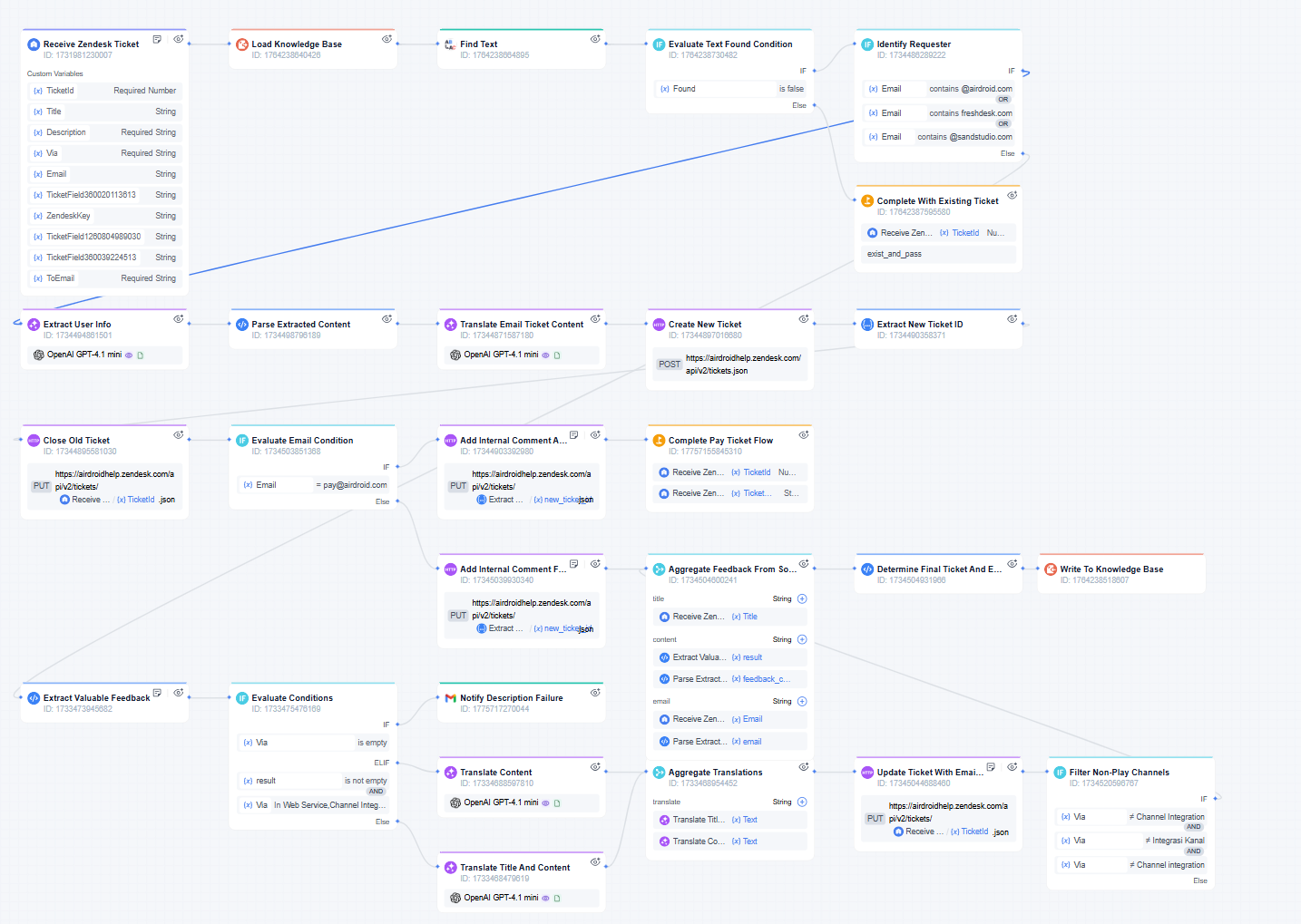
Here's how the workflow operates in practice:
- When a new ticket lands in Zendesk, the workflow springs into action: it instantly checks for duplicates (based on requester, topic, and recent activity) and extracts key details from the content.
- The system automatically scans each ticket for high-priority signals—such as payment or security concerns—and flags these cases for immediate attention, ensuring they are escalated and resolved without delay.
- If the ticket is in another language, the workflow auto-translates the feedback into clear, standardized English —ensuring every agent and product manager can quickly understand the core issue, no matter its origin.
- Based on the ticket's source and content, the system decides whether to update an existing case, create a new one, or close out duplicates—always logging internal notes for traceability.
- All cleaned and consolidated information is synced to the Knowledgebase in real time, so similar future questions can be answered faster and with more consistency.
Results: Scalable Support, Quantifiable Gains
Within weeks, our automated workflow transformed Zendesk from a manual, backlog-plagued system into a scalable support hub. The measurable impact was evident across quality, efficiency, and business value:
| Metric | Before | After |
|---|---|---|
| Average Triage Time | 5–10 min per ticket | 1–2 min per ticket |
| Duplicate Ticket Rate | 8–15% | 1–3% |
| Agent Updates | Avg. 200 - 300 updates | Avg. 400 - 500 updates |
| End-user Updates | Avg. 150 - 250 updates | Avg. 250 - 400 updates |
| Requester Wait Time (hrs) | High fluctuation, 100 - 250 hrs | Stabilized around 50 hrs |
The automated Zendesk workflow delivered substantial, measurable improvements across all key support metrics:
- 80%+ reduction in Requester Wait Time: Average wait time dropped from 4–10 days (100–250 hours) to under 2 days (less than 50 hours), directly addressing the most critical user pain point.
- 2x increase in ticket throughput: The team scaled up to handle surging ticket volumes without expanding headcount, eliminating manual backlogs.
- Sharp decrease in manual intervention: Agents were freed from repetitive triage and translation tasks, driving a significant boost in productivity.
- Higher user satisfaction: Accelerated response and resolution times produced a marked rise in customer satisfaction and a sustained drop in complaint rates.
- Continuous optimization through data: The workflow generated operational data that feeds back into process refinement, enabling ongoing efficiency gains and quality improvements.
Notably, these gains were achieved without increasing team size, transforming Zendesk from a manual bottleneck into a resilient, data-driven support engine.
Looking Ahead
With our automated preprocessing workflow fully operational, the team plan to expand its capabilities to drive further efficiency:
- Enhanced Auto-Classification and Tagging: Building on high-certainty ticket auto-classification and tagging to enable asynchronous batch processing and automated responses.
- Dedicated Automated Response Workflow: Maintaining the preprocessing workflow's focus on classification and tagging, with automated responses handled by a separate, dedicated workflow.
This case is not just a one-time fix but a reusable methodology that can be extended to other high-ticket-volume, structured support scenarios. This approach is ideal for support organizations facing:
- High ticket volumes and multiple inbound channels
- Multilingual support requirements
- Frequent cross-team handoffs (e.g., Tech Support, Billing-Refund, Device Ops, Partner Support)
"With automation in place, we saw a dramatic drop in manual intervention—our support team can now handle far more tickets, which directly optimizes labor costs. At the same time, the faster ticket flow and shorter resolution cycles have made our entire business more agile, enabling us to iterate and respond to customer needs much more quickly than before."





Leave a Reply.