Highlights
- • Automating data extraction from social media links to eliminate manual video tracking.
- • Batch processing with loop nodes allows users to update dozens of records in a single run.
- • Enabling self-service stats in the Collaboration Workspace for instant team-wide data access.
Overview
The marketing team at Sand Studio tracks performance for KOL collaborations and official videos. Previously, this required opening many social media links individually to record titles, views, and likes. This workflow automates that process by reading links from a table, extracting live data, and sending a summary to the team’s communication tools.
The challenge
Before using GoInsight.AI, the marketing team dealt with three main issues:
Repetitive manual work: Staff had to open links for TikTok, YouTube, and other platforms one by one, which was slow and tedious.
Error risk: Typing titles and view counts into spreadsheets manually caused mistakes and data inconsistencies.
Data lag: Manual updates took a long time, so the metrics were often old by the time the reports were reviewed.
The solution: Social Video Performance Tracker
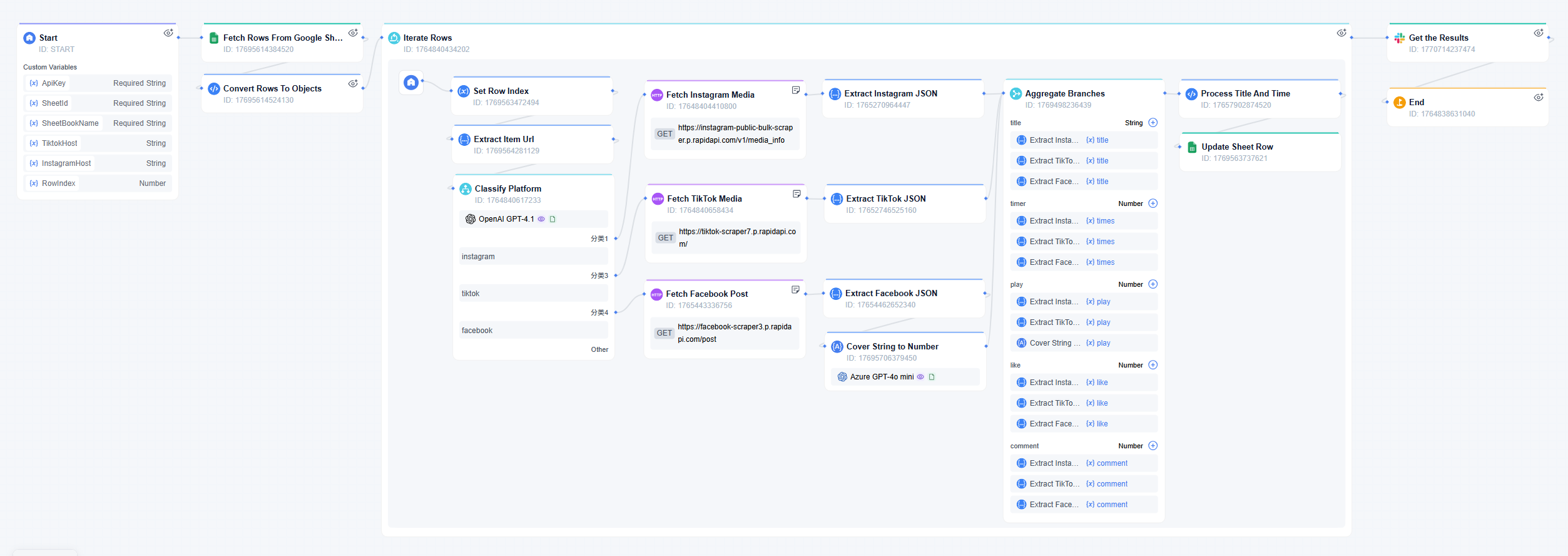
The team built a workflow called "Social Video Performance Tracker," which reads social media links from a prepared spreadsheet. The system identifies the platform, scrapes the latest data, and updates the spreadsheet. After finishing, it sends a report via Slack, Teams, or other designated platforms so that the team can see results without opening the table.
How the workflow works
- Workflow Configuration
- Enter the necessary credentials, spreadsheet identifiers, and platform host details. Also, define the specific row range to ensure the system processes only the intended links.
- Loop initiation
- The system enters a loop node to handle the links row by row. This ensures the batch of data is processed in a stable sequence until every specified row is finished.
- Classification & sequential extraction
- Inside the loop, a classifier identifies the platform for the current link. The workflow then runs through the full extraction sequence for all configured platforms. It fetches the data and writes the results into the correct row of the spreadsheet.
- Batch completion & notification
- Once the loop completes the process for every row in the range, the system exits the cycle. It then sends a single notification with a summary to Slack to alert the user that the entire batch is ready.
The star nodes
Runtime parameter control
Users specify which rows to query using "began" and "end" parameters. This allows for specific updates and saves system resources.
Natural semantic classifier
This node identifies the platform of each link (TikTok, YouTube, etc.) and directs the workflow to the correct scraper.
Loop node
This ensures every link is processed individually until the list is updated.
Slack Notification Node
After the data is logged, users receive an automated message with a summary of the results. This removes the need to check the table manually.
The Impact
Reduced manual labor
The workflow automates link opening and data extraction, which shortens the time needed for logging.
Improved accuracy
System-led extraction removes human error, ensuring view counts and titles match the source exactly.
Self-service access
Other teams can use this workflow in the Collaboration Workspace. By "@" this workflow and providing a link, they get instant stats without needing to access the workflow configuration.
Passive information receipt
Users receive notifications once tasks are complete, allowing them to focus on other work instead of watching progress.
Real-time decision making
Teams can access real-time data to evaluate the performance of KOLs or official videos based on the latest market feedback.
What's Next
The creator plans to support their team by adding more regional and emerging social media platforms. This ensures the team can track performance across all markets, including niche apps that are gaining popularity.
Additionally, the creator intends to configure different enterprise communication platforms. This will allow the workflow to send notifications to various apps based on the specific needs of the team.
"If you need to bulk query KOL links, you don't need to open them one by one anymore. This workflow handles the search and the logging for you."
Bring your team, systems, and AI into one place—then turn ideas into governed work.
Start Free Trial





Leave a Reply.