
Highlights
- • Automating ticket analysis to stop repetitive manual copy-pasting for the CS team.
- • Real-time data fetching ensures every summary is based on the latest Freshdesk activity.
- • Enabling self-service inquiries in the Collaboration Workspace so other teams can check status without asking CS agents.
Overview
At Sand Studio, the Customer Success (CS) team handles many customer tickets in Freshdesk. To solve issues quickly, agents need to understand the full history of each ticket. Before, this was a manual grind. Data was buried in long conversation threads, making it hard for anyone to get a clear picture fast. The goal was to help the CS team work faster by automating how they pull and analyze this information.
The challenge
Before using GoInsight.AI, our CS team faced three main problems:
High Manual Work: Agents had to manually copy and paste long ticket records into AI, which was slow and tedious.
Poor Analysis: Long tickets are messy. Simple copy-pasting often caused the AI to lose context, leading to inaccurate summaries.
Low Transparency: Other teams (like Sales or Tech) could not see ticket progress in real-time. They had to ask CS agents for every update, causing delays.
The solution: automated ticket analysis workflow
To improve efficiency, the CS team built a workflow in GoInsight.AI. This system pulls ticket data from Freshdesk automatically via API. It provides the AI with the full context needed for accurate summaries and ensures that the information is always fresh, eliminating the lag of manual syncing.
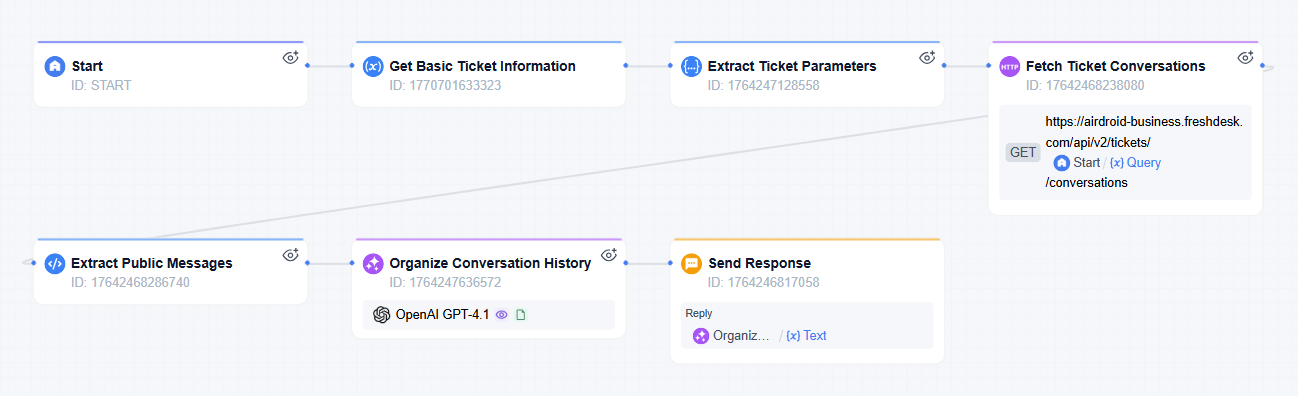
How the workflow works
- Ticket ID Input
- A user enters a ticket number to start the process.
- Intent Recognition
- A classifier decides if the user wants the full ticket details or just a quick summary.
- Real-Time Data Retrieval
- The system uses an authorized Freshdesk login to pull the latest data. Each time the workflow runs, it fetches the most recent information for both "Basic Info" and "Conversation History."
- AI Analysis
- The LLM organizes the data and provides the final report to the user in the workspace.
The star nodes: Freshdesk APP & Natural Semantic Classifier
Freshdesk APP
This node uses an authorized Freshdesk login to pull data. It performs two requests—one for "Basic Info" and one for "Conversation History." This ensures the AI understands both the current status and the whole story behind the ticket using 100% real-time data.
Natural Semantic Classifier (Question Classifier Node)
The system uses set rules to understand what the user wants. If the user enters a ticket number, it shows the full details. If the user asks for a "summary," it provides a brief analysis. This makes the tool very flexible.
The impact
Saving time
Each run saves at least 10 minutes that used to be spent on manual research and summarizing.
Zero sync delay
Because the workflow pulls data directly via API every time it is triggered, agents always see the most recent updates and solutions.
Lower communication costs
Sales and tech teams no longer need to keep asking the CS team for updates. They can get the information themselves in the Collaboration Workspace.
What's next
This workflow is very flexible and easy to reuse. It is already a public tool in our workspace.
Now, other team members can simply "@" the agent and enter the target ticket number in the Collaboration Workspace to get info without even opening the workflow.
Moving forward, we plan to add a "fallback" rule to the intent classifier to recognize unrelated questions, making the workflow even more stable. We also plan to open access to other teams based on specific permissions. This will make it easier for them to check ticket status or perform their own customized actions.
"It turned the ticket backgrounds that we used to manually copy, paste, and explain repeatedly into a process that is always accessible, auto-synced, and completely worry-free."
Bring your team, systems, and AI into one place—then turn ideas into governed work.
Start Free Trial





Leave a Reply.