According to research by Forrester Consulting, companies with mature customer success programs can achieve 12% higher revenue growth and 19% higher gross margins compared to those that don't. In terms of SaaS, Business Intelligence (BI) and customer health metrics are even more vital for Customer Success teams. It scores customer health that can contribute to retention rates and substantial gains. In this post, we'll dive into the workflow our Customer Success team uses to reduce BI reporting cycle times and provide faster access to customer health insights anytime, anywhere.
Challenges
If you're familiar with the daily tasks of Customer Success teams, you might have faced the dilemma that our team used to leave with.
The most significant one is that there is too much data in BI reports, not to mention that the dashboards are complex in most situation. That's because BI reporting must pull diverse data from multiple systems like CRM and ERP. From how often does a customer use the tool to what plan the user subscribes, so many metrics are shown on the dashboard that make it difficult to read. In the past, our team might spend more than 20 minutes in each report to identify customers' status and get insight into customer health. With no doubt, it slow decision-making.
Besides that, the other challenge is more related to data security. As mentioned above, the report required data in customer behaviors and habits. Such data is not just valuable company asset, but actually customers' privacy. Take the data security as the priority, our team is allowed to access to these data in the office only, when they're in the internal network. But when you need to follow up customers worldwide with time difference, it would increase the response time which might have an impact on the business performance.
Solution
To address these pain points, our Customer Success team became very early users of GoInsight.AI. Their initial goal was to get reports on customer health without access to the database. The workflow must capture raw customer data, then summarize it into a structured and readable report, and allow the team to get the reports within the company's messaging app by inputting the customer's email within the chat.
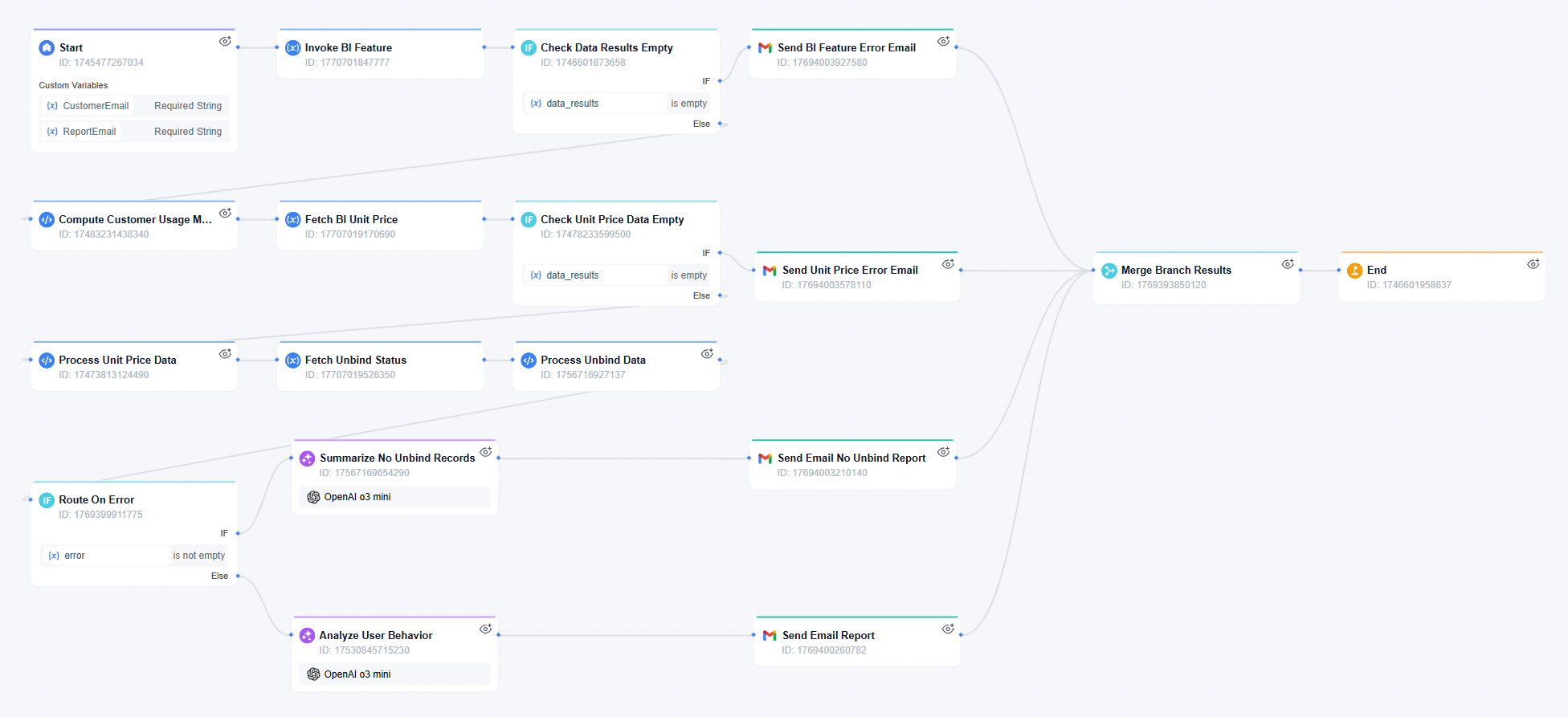
The workflow below shows that they have realized it as proposed. Take a look at it, you can easily see that this workflow contains three key actions. The start point is to trigger the workflow with an email address via @ mention, then it will match data in the database and clean the data. After that, the workflow will return results and the customer health report to the chat.
During the process, our team has applied diverse nodes to ensure the workflow captures the right data and sends insightful messages back. For example, after the API node has matched the email address with customer data, Code nodes within the workflow will clean and structure the data by many variables, including basic info, first purchase date and time, last login time, and so on. Then, the LLM model will analyze user behavior based on this data and provide the team with final summaries.
Results
Now, this workflow is widely used by our Customer Success team. With its help, the average time spent reading each customer health report reduces from about 20 minutes to less than 20 seconds. The team members can focus on more valuable and important tasks.
Meanwhile, because it applies the API node to capture required data rather than requiring the team to access the database directly, it allows the team to receive reports for specific customers whenever and wherever they need, which creates a balance between the premise of data security and accessibility. The convenience it brings to the team contributes to the efficiency, as well as a better rate of renewal.
What to Expect In the Future
So far, our Customer Success team still needs to trigger the workflow manually on demand. Their next step is to develop this workflow for a scheduled trigger that can always keep updated with the latest status of customers and provide appropriate services when customers need.
And of course, for any business and department that needs to monitor the current usage and health of customers, this workflow can contribute to their daily work as well. For this reason, our Customer Success team is working on modifying it for a larger analysis and making it a productivity tool for the enterprise company.





Leave a Reply.