
Overview
Manually researching complex questions wastes time and leaves gaps in insight. Agentic RAG solves this by iteratively querying internal knowledge bases and, if needed, the web—automatically assessing coverage and generating new queries until the information is complete. It then compiles a clean, structured report ready for immediate use.
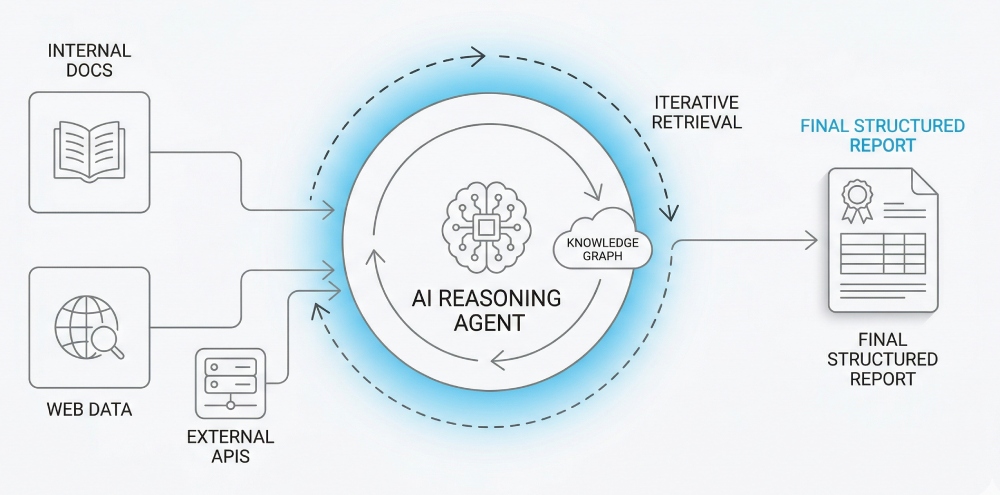
Generated by AI
The Impact
- Automate Iteration. Eliminate manual back-and-forth by running multi-round searches that fill missing info.
- Boost Accuracy. Merge and deduplicate diverse data sources to avoid redundant or outdated info.
- Expand Coverage. Combine internal and web data dynamically to cover all angles.
- Deliver Ready Reports. Generate structured summaries that directly answer your query.
Who This Is For
- Product Managers conducting rapid market research with internal and public data.
- R&D Teams completing technical feasibility studies by combining proprietary and external resources.
- Competitive Intelligence Analysts continuously tracking and summarizing competitor info.
- Data Researchers seeking comprehensive, verified content synthesis.
How It Works
- Initialize Parameters
- Set up core variables like ActiveQuery, empty results list, and rationale storage for iteration.
- Iterative Knowledge Base Search
- Search internal data for ActiveQuery, merge new results while deduplicating by BlockId, and check if new info was found.
- Assess and Generate Next Query
- Evaluate if current info suffices; if not, formulate a new, optimized query to fill gaps or pivot search angle.
- Optional Web Search & Crawl
- When enabled, generate high-quality Google queries, execute searches, extract non-PDF links, and batch crawl with AI summarization.
- Compose Final Report
- Integrate all data sources into a structured, concise report that directly answers the initial query.
What You'll Need
Before using this template, make sure you have:
- Access to internal knowledge bases or uploaded searchable documents for retrieval.
- Optionally, permission and API access for web search and web crawling tools if external data supplementation is desired.
- Clear initial query phrased as a concise question or statement to trigger relevant searches.
- Environment supporting iterative workflow execution and handling of JSON data merging and deduplication.
How to Use
- Step 1. Prepare Your Query
- Step 2. Configure Search Scope
- Step 3. Run Iterative Retrieval
- Step 4. Review Crawled Content
- Step 5. Verify Final Report
Enter a clear and focused question or statement as your initial query to start relevant retrieval.
Decide whether to enable web search to supplement internal knowledge bases or rely solely on internal data.
Let the workflow iteratively search, evaluate, and refine queries to fill knowledge gaps automatically.
If web search is enabled, the workflow will crawl and summarize relevant web pages to enrich results.
Inspect the generated structured report to ensure it fully addresses your original query and meets quality expectations.


